By Jinwoong Kim CPO, NexCloud (NexClipper)
Today, I’m going to explain about the Prometheus exporter.
Prometheus ecosystem components
Prometheus is basically instrumenting the metrics of an application or a third-party system (service), which is usually scraped through the target endpoint.
Not all applications or services generate Prometheus compatible metrics. Therefore, collection targets that are Prometheus targets can be collected in the format of client libraries and exporters.
Client Library
The best way to set up monitoring when developing service is to use the Prometheus client library to write and instrument metrics directly based on code inline.
By default, Go, Java (Scala), Python, and Ruby provide official libraries.
- Client Library : https://prometheus.io/docs/instrumenting/clientlibs/
Since unofficial libraries are run by users in the community, they can also be a problem with code maintenance, so you should always use them while checking the release information.
Exporter
Exporters can expose metrics from packaged software or third-party systems (services) where code cannot be modified directly. Usually, vendors or service companies expose metrics directly, but a separate exporter is required to instrument software such as the Linux system kernel, network equipment, storage, and databases.
Almost all services are provided by the community and users, and you can check the status of exporters from the link below.
- Exporter : https://prometheus.io/docs/instrumenting/exporters/
- ExporterHub.io : Exporter catalog page recently released by NexCloud
Using the Client Library
I’m going to show a simple example of using the client library. The code was used earlier in Spinnaker based Canary deployment test.
- Python client library : https://github.com/prometheus/client_python
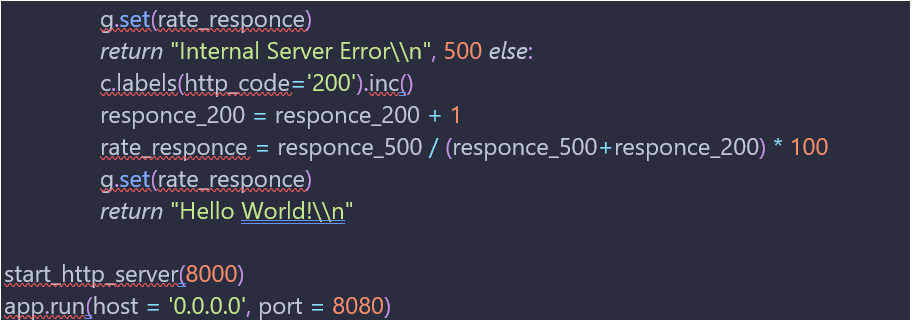
Let’s take a quick look at the code. The app.py was written based on Python Flask, and with the prometheus_client library added, I used start_http_server for the metric HTTP endpoint (:8080).
Simply generate the internal 500 error in the desired ratio and to confirm an artificial metric, create success_rate variable and configure a simple metric server(:8000) to instrumentate with Gauge, Counter.
To check the Counter metric type, set the label to http_code=’500′, http_code=’200′.
Finally, to declare it as a Gauge metric type, add a code of g.set(rate_responce).
Exposed endpoints and exporters may be set to different paths, as shown above, but use the /metrics path as usual. ex) http://localhost:8000/metrics

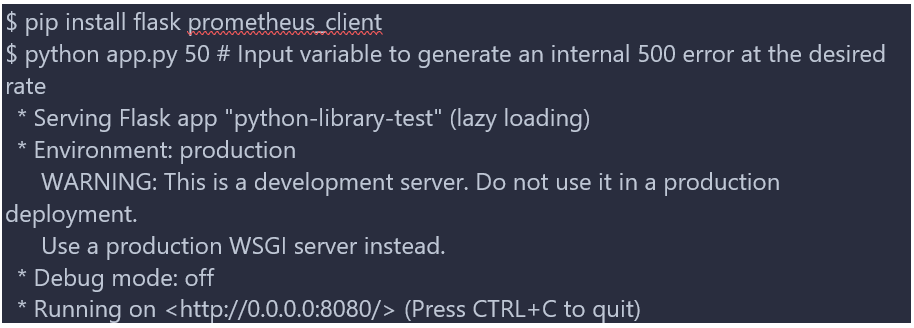
It is for testing purposes, let’s simply run locally.
In order to collect the metrics, we simply use the ab command and make repeated calls.

Requests, Non-2xx responses should be looked at in detail in the results.
Because an error was generated by making 1000 requests with a 50% probability of the input factor, success can be confirmed as 495 times and errors 505 times.
Let’s try connecting to the exposed port 8000 to check the metrics.
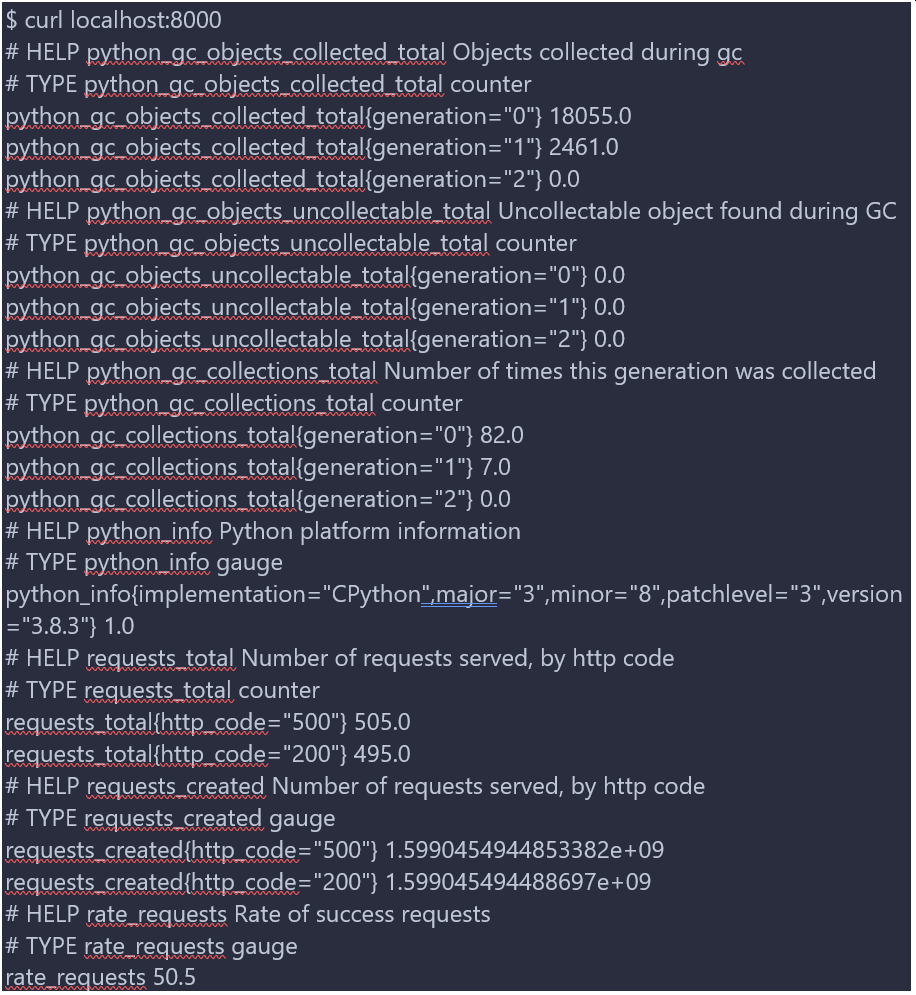
If you look at the http_code=’500′ and http_code=’200′, Counter that I wrote, you can see that it is the same metric I checked in ab.
And if you look at rate_requests set with Gauge, you can see that the success rate is 50%.
Use Exporter
I am currently using macOS and want to use node_exporter to check host metrics.
- node_exporter : https://github.com/prometheus/node_exporter
node_exporter is an exporter officially provided by the Prometheus community and I’ll try to simply run it by receiving a binary.
Search node_exporter at ExporterHub.io, which was provided recently by NexCloud as a curation page for community users.

https://github.com/NexClipper/exporterhub.io/blob/master/lists/node/README.md
Referring to the linked readme page above, run node_exporter locally on macOS. Since it is in binary, it can be run as a container, but on macOS, there was an issue with the host network, so I ran it myself.


Basically, as mentioned above, there are reserved port information and node_exporter exposed to /metrics endpoint, so try to access http://localhost:9100/metrics. You can check the machine metrics of the MacBook currently in use.


Since the process of linking with Prometheus is a setting change, I will not mention it here.
ExporterHub.io
ExporterHub.io was created for Prometheus community users, and was created for the purpose of providing a curation list similar to the awesome project.
Not only curation information but also simple installation guide, alert-rule setting, and dashboard related information can be viewed at once.
If you have an exporter under development or have any corrections or improvements, please feel free to send issues or pull requests.
##
To learn more about containerized infrastructure and cloud native technologies, consider joining us at KubeCon + CloudNativeCon NA Virtual, November 17-20.
About the Author
Jinwoong Kim, CPO, NexCloud (NexClipper)

Cloud Engineers are like catalysts to lead and inspire colleagues and customers.