Look at a typical end-user computing stack from the top down. Identity has a name: IAM. Devices have one too: unified endpoint management, or UEM. Desktops and sessions have VDI and DaaS.
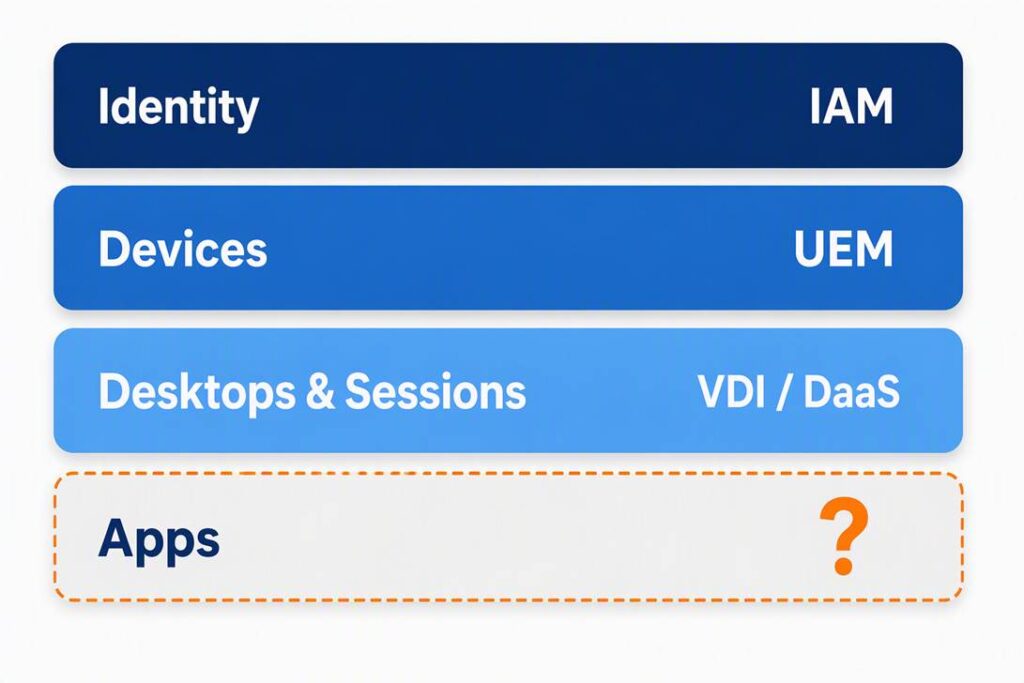
Now look at the bottom row, the apps. These are what people actually open all day. Yet in most organizations, apps get packaged, tested, delivered, and patched separately inside each tool that touches them. That layer has no name, so it rarely gets a strategy.
It’s time to give it one.
One app, four rebuilds
Take a single browser update. The vendor ships one release. On the IT side, that release often turns into three or four separate jobs:
- A Windows package for Intune or ConfigMgr
- A macOS package for Jamf
- Either, though occasionally both:
- An updated image for on-prem VDI like Citrix or Horizon
- An updated golden image for cloud VDI like Azure Virtual Desktop or Windows 365
Each job needs its own package, test pass, deployment, and patch cycle. Scripts can handle some of the wrapping and publishing. But someone still has to source the installer, test it, and approve it. A few weeks later, the next release arrives and the cycle starts over.
The math is unforgiving. App work grows with the number of applications and environments, not the size of your team. Add an application or environment and the workload gets heavier. That’s why so many teams spend days on each patch cycle and lose a large share of their week to reactive work.
Custom apps carry most of the load
Commercial catalogs get most of the attention, and they matter. But the real drain is usually your custom and line-of-business apps. These are the in-house tools, vertical software, and vendor installers nobody else packages. They’re a small share of the catalog but take up most of the team’s time.
Device-first tools weren’t built around this problem. That isn’t a flaw in them. A UEM is designed to enroll devices, enforce policy, and manage compliance, and it does those jobs well. Apps are an add-on to its core job, and each platform handles them separately.
Strategic moves stall on apps
Most IT leaders have a roadmap. Common items include Citrix to AVD, ConfigMgr to Intune, Windows on ARM pilots, device refreshes, and new AI tools. The infrastructure side of those moves is usually well understood. The capacity to rebuild every app for every new target is not.
This is where projects slow down. A device can be enrolled in minutes, but the user isn’t productive until their apps arrive. A new VDI platform can be live, but it’s only useful once the app estate is rebuilt for it. App readiness is often the hidden critical path.
Meet Unified Application Management
Unified Application Management (UAM) is the name for the missing layer. It’s a simple idea.
UEM manages devices. UAM manages the apps on them.
UAM means automated app delivery, continuous patching, and clear visibility across every operating system, chip architecture, and delivery model. In practice, a UAM approach should meet four tests:
- Cross OS. The same app definition and catalog work on Windows and macOS, when applicable.
- Architecture aware. The right build lands on x64 or ARM64 without becoming its own project.
- Virtual and physical. Apps reach laptops, on-prem VDI, and Cloud PCs without a separate package for each.
- Cloud native. It runs as SaaS, so there are no servers to stand up or maintain.
The goal is to define each app once and deliver it everywhere. When the next release ships, IT updates one definition and every environment picks it up.
Your UEM stays
UAM doesn’t replace your UEM or your VDI platform. Intune keeps enrolling and securing devices. ConfigMgr keeps imaging, inventory, and Windows updates. Citrix, Horizon, AVD, and Windows 365 keep brokering sessions and hosting desktops. Device enrollment, security policy, compliance state, and conditional access stay where they are.
UAM sits beside those tools and takes on the app work they were never built to unify. Nothing gets ripped out.
What changes when apps have their own layer
Organizations that treat apps as their own layer are seeing measurable results:
- Faster migrations. Dutch hospital group Gelre Ziekenhuizen migrated 350+ core applications in two weeks. It had expected a 12-month effort with a different approach.
- Lower cost of ownership. Canterbury Christ Church University reported a 50% lower TCO and about a 90% reduction in time spent configuring, deploying, and updating apps.
- Faster day-one readiness. A federal IT-services team cut a static Autopilot build from 45–50 minutes to 19–25 minutes, with apps delivered in sequence during provisioning.
- Calmer CVE surges. One customer saw Chrome and .NET vulnerability spikes in early 2026 remediated automatically, while application health stayed at 97%.
The common thread is that the team stopped rebuilding the same app for every platform.
How to start
You don’t need a big-bang project to adopt UAM thinking. Start with three questions:
- How many platforms does one app have to reach in your environment? If the answer is two or more, the multiplication problem is already costing you.
- Which apps eat the most time? Look hard at custom and line-of-business apps first.
- What’s next on your roadmap? Find the move that’s waiting on app readiness and use it as your pilot.
Every other layer of the stack got a name once the problem got big enough. Apps have reached that point.
Want to see what a dedicated application layer looks like in practice? Explore how Recast Application Workspace delivers the same package to laptops, Cloud PCs, and virtual desktops while Intune and VDI keep doing their jobs.
##