Many people thought remote and hybrid working would be a temporary solution to a temporary problem. However, the swift advances in technology and changing attitudes mean that remote working is very much here to stay. In fact, 2022 saw a 24% increase in people working remotely compared to the previous year.
One major worry for employers was that the productivity of remote workers would suffer. After all, with no one to watch them, surely people would spend half the day on the sofa watching reruns of Dallas. And although 62% of workers say they feel more productive working remotely, it remains a primary concern. How do you manage your remote and hybrid workers in such a way that you boost employee productivity?
What is remote worker management?
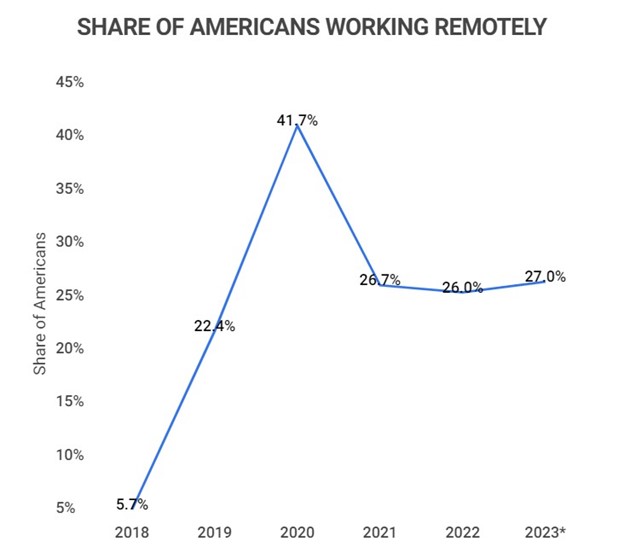
Image sourced from Zippia
Managers have years – if not longer – of experience in managing employees in an office situation. The advent of remote working presented many challenges, some of them unique. Hence, managers had to find new ways of supervising staff and ensuring those employees had all the tools they needed to work effectively.
If staff work a hybrid model, then some managerial tasks, such as work reviews, are straightforward. But if your staff works a purely remote model, then some tasks become difficult and can rely on efficient technology and communications tools such as those found in a call and contact centre.
Managers also need to be aware that remote working can vary greatly. There may not be the same 9-5 mentality or pattern and they need to take that into account. Good remote worker management requires a 360° overview that can help the worker when needed and can help improve efficiency and boost employee productivity.
Technology
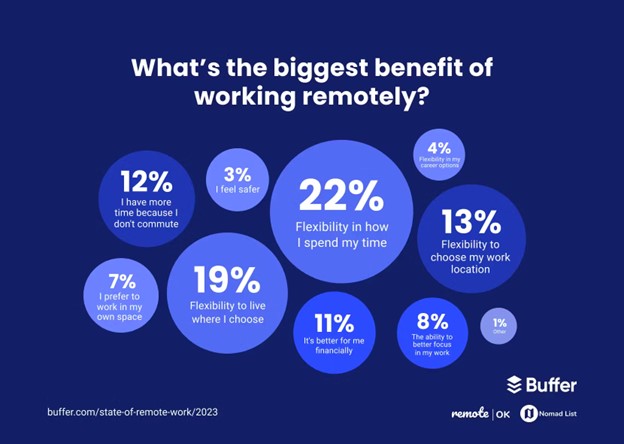
Image sourced from Buffer
Remote working roles can be as varied as in-office ones. You could be working as a customer support agent or you could be debugging software. What unites all these roles is the need for the technology that allows them to do their job effectively. In fact, you’ll find that that technology can be the same in many scenarios.
1. Unified communications
Communication tools lie at the heart of successful remote working. Unified communications (UC) is a range of technologies that offer different solutions, such as chat, video, VoIP, and collaboration tools, within one unified platform. This means that there is an effective avenue of communication in both directions. You’ll see that many of these tools are very similar to their equivalent cloud contact centre solution.
Of course, as with other internet-reliant tools, their effectiveness is going to depend on how good, and fast, your internet connection is. But if that’s taken care of, then remote staff have the foundation of efficient remote working. UC offers several benefits to you and any of your team working a remote or hybrid model.
- Collaboration. If you want to boost employee productivity, then ensuring there is good collaboration will often be your starting point. Collaboration tools need to include features such as file sharing so that people can review and add to other’s work.
- Video conferencing. As well as good audio communications, video meetings can be an integral part of your remote worker management plan. Not only is video essential for team meetings, it can also contribute to reducing workers’ feelings of isolation as informal chats can replace the traditional water cooler gossip.
- Cost savings. We could highlight the many ways that remote working can reduce your operational costs. However, if someone asks, what is operational audit going to show regarding UC, you’ll find that the answer is that you will see significant savings when your various communication tools are consolidated on one platform.
- Better productivity. UC as a whole can help to boost employee productivity. When your team has access to a single unified platform, then it can help improve nearly every aspect of their work, making them more efficient and productive.
2. Cloud computing
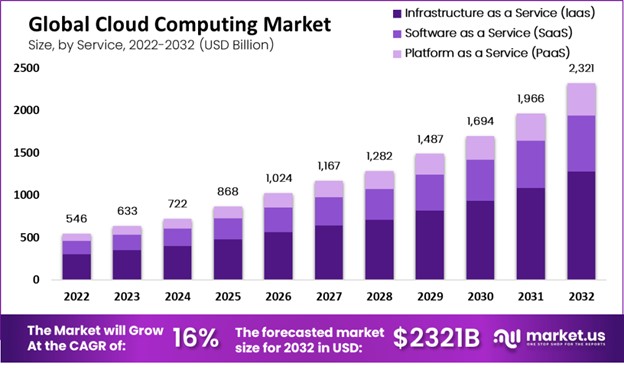
Image sourced from Techopedia
One challenge facing many remote workers is the ability to access central databases and other data they may need to do their work effectively. With cloud computing, a worker can access pertinent information no matter where they’re located. It also means that they have access to the computing power they may need when it comes to tasks such as data analysis or software development. Of course, it also brings similar benefits to any on-location staff you have.
- Scalability. You can scale your cloud computing resources up or down as needed. If your business encounters different workloads at different times of the year, this can be perfect and it can save you money.
- Accessibility. As long as you have a decent internet connection, workers can access cloud computing regardless of where they are, whether an office in Boston or a beach in The Bahamas.
- Cost-effectiveness. Of course, saving costs where possible is important to your C-suite. With cloud computing, you usually only pay for the resources you need rather than that costly hardware that sits in a corner gathering dust.
- Security. Handling sensitive information can be a major concern when it comes to remote workers, especially if your business has to comply with relevant laws and regulations. Cloud computing providers offer robust security measures as well as having cybersecurity experts constantly looking for new threats and ways to neutralize them.
- Innovation. Like other areas of technology, cloud computing providers are constantly looking for new ways of doing things or improving existing features. This innovation comes at no cost to you but can give you a competitive edge.
3. Business applications
If you’re seeking to boost employee productivity in your remote teams, then there’s a very good chance that you’ll look at business apps to help. Combined with cloud computing, these can level the playing field and can mean that your remote and hybrid staff have the same access to tools that your in-house workers do.
While some business apps may be specific to your business, others may be common to many businesses and can help remote teams work better. They can assist in everything from helping you auto-respond to emails to collaborating on design projects.
What you have to consider carefully is what apps will best assist your staff and also how well those apps will integrate with your existing systems. Identifying the apps that best help employees and that suit those systems can be a big step on the path to higher productivity levels.
Challenges to boosting productivity

1. Preventing isolation
Remote workers can often feel isolated and managers need to find ways to overcome this challenge. Check-in with team members at least once a week for a one-to-one call and also hold regular team meetings via video call. You can also encourage workers to stay connected with each other via informal chats.
Have a mental health first aid section in your knowledge base or database so that they can access it when needed.
2. Measuring productivity
It’s all very well saying you want to boost employee productivity, but how are you going to measure it? Discuss productivity with your team members and agree on common goals you’re aiming for as well as how you will measure progress and success. You ask what is a contact centre going to do to track productivity and apply some of the lessons learned from that.
Having common goals and measurements can not only help foster high levels of collaboration but also a spirit of camaraderie when every employee knows what their goals are and they work together to achieve those goals.
3. Avoiding miscommunication
If you mainly communicate with chat apps and emails, you are lacking the ability to use tone of voice and body language as cues. This can then lead to miscommunication in some scenarios. Try to have some sort of guide as to when to use video conferencing/meetings instead of other, less efficient forms of communication.
For example, some of your HR staff work remotely and you want to make some changes to the time to fill calculation tactics for recruitment. By holding a video meeting, you will be able to tell by body language that all team members understand what you want to do.
4. Understanding the work-life paradigm
If there is an element of disconnect between managers in charge of remote teams and the actual workers, then you may face some difficulties. This can be especially true if the manager is 100% office-based. Managers need to understand that part of the work-life paradigm is choosing their working hours and they also need to respect that.
You should not only be mindful of each employee’s working schedule but also be aware if there are any unplanned changes to how they work, such as working too much or failing to finish tasks on time. Discuss any issues with staff and identify any training needs. Also, remember that managers are people too, and that they will sometimes need support and/or extra training.
The takeaway

Remote and hybrid work is here to stay. Employers need to not only recognise that fact, and the challenges it brings but also be prepared to implement strategies that will support those workers. Being sure that your staff are happy and supported can be the first step on the remote working path.
Productivity levels will always remain one of the priorities. A combination of good remote team management and relevant technology can be the foundation on which you build efficient remote working. Within the technology area, effective communication tools will remain the single most important factor in preventing your employees feeling disconnected from the company.
##