Networks provide fast and reliable means of sharing information and resources between devices and locations, making them a crucial organizational asset. There is a unique set of nodes and connections in every network. The network’s topology, or the configuration of its nodes and links, affects maintenance costs, performance, and other metrics.
Any network disruption can interrupt all activities, which might have devastating results. To avoid this, you must understand the structure and operation of your network as a whole.
In this blog, we will explore the basics of network topology and how to choose between the different types.
What is Network Topography?
Network topology describes the physical layout of nodes and connections in enterprise networks and how they communicate with each other. Topology can be divided into physical and logical. The former represents the physical medium through which data is transmitted. The latter represents data transmission between devices on a network, regardless of the physical connections between those devices.
Why is network topology important?
Your network’s topology has a direct impact on its performance, making it essential to make the right choice for your business. You can cut operating costs, boost performance, and manage vulnerabilities by making a choice that suits your business’s resources and needs.
For instance, choosing a topology that provides the required connectivity and bandwidth to support the demands of hosted and cloud-based communication services can make a huge difference in business outcomes.
Network topology is essential in large-scale enterprises because it:
- Facilitates deeper understanding of networks
- Helps lower network operating and maintenance costs
- Assists in choosing a cable medium for a network
- Enables effective communication between diverse components
- Influences the accessibility and security of complex digital systems and processes like VNC setup for Ubuntu.
8 Types of Network Topologies You Should Know About
1. Mesh topology

Free to use image from Unsplash
Every node in a mesh topology has a point-to-point, non-hierarchical connection to other nodes. The web-like network is not dependent on a single node. There are two ways that data can be transmitted: routing and flooding. Data travels the shortest distance between two points in the routing method. In flooding, data packets are sent to all network nodes without considering routing options.
Mesh has two main types:
Full Mesh: All network nodes are connected to each other.
Partial Mesh: Some nodes are not connected to all others in the network.
Pros:
- Reliable and stable compared to other networks
- Easy to identify and resolve errors
- Damage to individual nodes doesn’t affect the network
Cons:
- Costly to set up and maintain
- Design complexity makes it time-consuming to execute.
2. Point-to-point topology
This basic topology simply connects two points together and dedicates the entire available bandwidth to both ends of the connection. Point-to-point connections are physically connected by a cable or wire. Nevertheless, topological connections via microwaves and satellite links are more common today.
Pros:
- Easy and affordable option to implement
- With only two nodes, it is quite easy to maintain
- Minimal communication delay compared to other topologies
Cons:
- Having a single common link means the entire network fails if the link is down
- Maximum of two nodes per network
- Requires connected devices to be in close proximity.
3. Bus topology
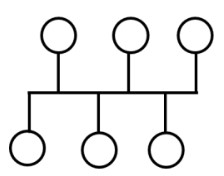
Image sourced from edupointbd.com
This topology uses a single cable to connect network devices, earning it the nicknames backbone and line topology. In a bus topology network, data only moves in one direction along the cable’s path.
Pros:
- Cost-effective solution suitable for small networks
- Easy to scale: add more devices by adding more cable
- Network structure is easy to navigate and understand
Cons:
- Network issues and device failure are difficult to track
- If the backbone cable fails, so does the entire network
- Increasing a device’s bandwidth consumption can affect network performance
- Operations can be slow since a single node is responsible for data transmission
- Lack of privacy, as server signals pass through all the nodes
- Data loss is possible over long distances
4. Star topology
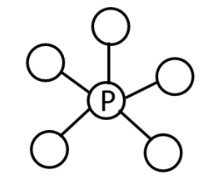
Image sourced from edupointbd.com
All nodes communicate with a central hub in a star topology. The hub, which controls and manages the network, requires a wire from each node to create a point-to-point connection. In this setup, data transmission requests between nodes are relayed through a central hub before being delivered to their respective destinations.
Pros:
- Damage to individual nodes doesn’t affect the rest of the network
- Easy to remove, reconfigure, or add nodes without shutting down the network
- Easy to troubleshoot
Cons:
- Vulnerable to central hub failure
- Costly to set up and maintain
- Central hub configurations determine performance and data transmission speed
5. Tree topology
As the name implies, this topology has a root node and secondary nodes that branch out. Star and bus networks are connected to achieve this, and all nodes are hierarchically connected. Thus, it’s also called the star-bus topology. Tree topologies work well for large networks found in universities, offices, and hospitals.
Pros:
- Easy to scale, add nodes with minimal disruption to the network
- Damage to individual nodes is isolated
- Easy to maintain and pinpoint faults
- Fast data transmission between hierarchical nodes.
Cons:
- Network relies on the root node
- High number of nodes and cables required make it an expensive option
- Complex design
6. Ring topology
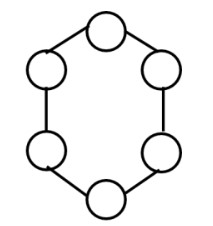
Image sourced from edupointbd.com
The nodes are arranged in a ring-like pattern in a ring topology. The devices form a circular loop with two neighbors per node. The data passes through all intermediate nodes in a circular direction. Although data typically flows in only one direction, this can be changed by creating multiple connections between the nodes.
Pros:
- Circular data flow minimizes collision
- Unidirectional feature enables fast data transmission
- Supports heavy traffic
- Reduced risk of losing data over long distances
- Easy to locate faults and troubleshoot
Cons:
- Cable failure can disrupt the entire network’s operations
- Data packets travel through multiple nodes before reaching their target
- Modifying, adding, and removing nodes disrupts operations
7. Daisy chain topology
The nodes in this topology are linked in a chain. Data moves from node to node until it gets to where it’s needed. Daisy chain networks are either linear or ring.
The former links devices in a linear structure with two ends, like a bus topology, while the latter forms a ring of devices. Ring daisy chain topologies reduce the number of senders and receivers by half because data travels in a loop. Additionally, the network doesn’t stop if a node or link fails because data can change directions to reach its destination.
Pros:
- Easy to set up and maintain
- Requires fewer cables
- Cost-effective option
Cons:
- Slow transmission speeds
- Vulnerable to faults
- Nodes must have two transmitters and receivers to exchange data.
8. Hybrid topology
Hybrid topologies result from combining two or more topologies. These are common in large organizations that combine departments with different network topologies. A hybrid topology supports tools like an enterprise communications platform to improve communication.
Pros:
- Offers superior flexibility when creating networks
- High scalability
Cons:
- Requires a high level of expertise to set up and maintain
- Costly to combine topologies in a single network
Ready to Get Started?
The best topography for your business depends on its size, your budget, and your overall goals. A comprehensive understanding of network functionality is also crucial when selecting your network topography.
Once that is done, use topography mapping software to generate diagrams that visualize the network environment. After making a choice, implement the network topography and monitor the performance to make necessary adjustments. Configuration management tools and network management solutions can help streamline execution.
Resources like Global App Testing’s guide to smoke testing could also provide valuable insights for managing regular business processes in different network topologies, considering the effects of accessibility, network connectivity, and performance considerations.
##