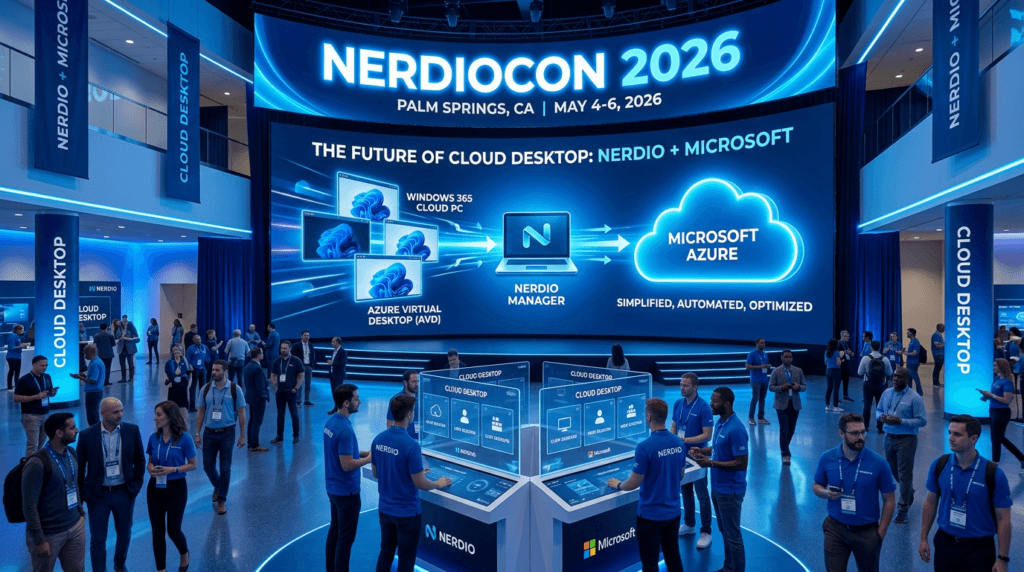
Palm Springs in the spring is already a pretty good deal. Add around a thousand EUC engineers, MSPs, and IT architects gathered around a shared obsession with cloud desktops, and you’ve got something genuinely worth flying across the country for. That’s been NerdioCon 2026 — loud, energetic, and packed with sessions that made you want to pull out your laptop and start planning a migration the moment you walked out the door.
VMblog was on the ground for two sessions that, taken together, painted a remarkably clear picture of where end user computing is heading — and how fast it’s getting there. First, a one-on-one conversation with Christiaan Brinkhoff, Senior Director of Product Management (R&D) at Nerdio, fresh off his own time on stage earlier that day. And second, a keynote from Tristan Scott, a 20-year Microsoft veteran who now owns a major chunk of the Azure Virtual Desktop and Windows 365 business at Microsoft.
Here’s what I learned.
Windows Has Always Been There — And That’s Kind of the Point
Tristan Scott opened his keynote the way you might not expect a Microsoft exec to open a technical session — with nostalgia. He asked the room who grew up using Windows. Almost every hand went up. He talked about Solitaire, about the card bouncing around the screen and hoping it would lay flat. He talked about The Secret of Monkey Island, wandering around for hours. He talked about the Windows 95 launch, the lines at CompUSA, people clutching installation CD-ROMs like they were concert tickets.
It wasn’t filler. It was a deliberate setup.
His point was simple and actually pretty compelling: Windows has been the consistent constant throughout the careers of everyone in that room. Jobs change. Teams change. Technologies come and go. But Windows was always there, running the apps, familiar enough that you didn’t have to think about it — you could just work. Over a billion people use Windows 11 today for exactly that reason. It runs the apps. It has enterprise-grade security. It’s familiar.
And now, he argued, that familiarity is exactly what makes the move to Windows 365 so powerful. You’re not asking users to learn something new. You’re just moving where Windows lives.
So, What Exactly Is Windows 365?
Here’s the thing — and Tristan made a point of landing this cleanly because it still gets muddled. Windows 365 is not an app. It’s not a subscription to Microsoft 365 tools. It is a full Windows PC. Your apps, your files, your settings. All of it hosted in Azure, streamed down to whatever device you happen to be sitting in front of — a laptop, an iPad, a thin client, a browser. You put your PC in the cloud. You access it from anywhere.
That’s it. That’s the idea.
And it’s not something Microsoft is still figuring out in a lab somewhere. This is production-ready, enterprise-grade, and rolling out at scale with real customers today. Three things make the case:
- Security: There’s no local data, so there’s no local risk. A device walks out the door. Your data stays in Azure.
- Elasticity: You pick your specs — storage, memory, CPU, GPU, NPU — based on what you need right now. When your needs change, you change the specs. No hardware refresh. No re-imaging users.
- Simplicity: Traditional VDI requires infrastructure investment, specialist staff, and ongoing complexity. Windows 365 abstracts all of that away. You manage Cloud PCs right inside Intune, alongside your physical endpoints.
For the third straight year, Microsoft was recognized as a Leader in the Gartner Magic Quadrant for Desktop as a Service — highest on ability to execute, furthest along on vision, and noticeably separated from the rest of the field. Tristan was careful to point out that this isn’t a lucky one-year result. It’s a consistent track record built on years of deliberate investment.
A Quick History Lesson Worth Knowing
The timeline matters here, because it explains why Windows 365 is as mature as it is. Microsoft launched Azure Virtual Desktop in 2019. In 2021, they launched Windows 365, which introduced the concept of the Cloud PC to the broader market. Every year since, they’ve extended the solution to cover more workers, more scenarios, and more deployment models.
Tristan also shared something worth noting for anyone who tracks how Microsoft prioritizes products internally. Satya Nadella is himself an active Cloud PC user. That kind of top-down signal in a company the size of Microsoft doesn’t just mean someone writes a blog post about it. It means the engineering investment keeps flowing. Tristan, a 20-year veteran who said he’s worked on many Microsoft products, described the investment Windows 365 has received as unlike anything he’s experienced in his career there.
The Full Product Portfolio — More Than One Size
A lot of people still think Windows 365 means “persistent desktop for office workers.” That was true in 2021. It’s a much wider product family now, and Tristan walked through all of it.
Windows 365 Business and Enterprise remain the bread and butter — persistent, dedicated desktops for information workers. Straightforward entry point, easy to understand.
Windows 365 Flex is where things get more interesting — and it comes with a rebrand announcement made right there at NerdioCon. What used to be called Windows 365 Frontline is now Windows 365 Flex. The reason? Customers kept deploying it to scenarios well beyond frontline workers — call centers, shift workers, occasional-access users — and then their own leadership would get confused because the product name implied something narrower than its actual use. The name changed. The product didn’t. You can deploy Flex in dedicated mode (one license, three Cloud PCs for three specific users) or shared mode (a pool of Cloud PCs shared across any number of users, with the only constraint being concurrent connections).
Windows 365 Cloud Apps takes the shared model further and strips it down to something even lighter — for users who only need one, two, or three apps. Get in, do the work, get out. The provisioning demo shown during the keynote was almost disarmingly simple.
Windows 365 Link is the purpose-built hardware device — no local apps, no local data, just a fast, direct connection to your Cloud PC. Think thin client, reimagined for a cloud-native world.
Windows 365 Reserve is the one that might get overlooked but shouldn’t. It’s essentially a standby Cloud PC for those moments when the unexpected happens — ransomware encrypts a disk, a device gets lost at an airport, a laptop dies mid-trip. Pre-configured Cloud PCs are waiting, and a user can be productive again within minutes. Not days. Minutes.
Breaking News From the Stage: Price Cut and a Big AVD Announcement
Two announcements stood out as immediate, actionable news — the kind of things MSPs should have been texting their teams about before Tristan even left the stage.
First: effective May 1st, Windows 365 for Business — the SKU designed for organizations with fewer than 300 users — is now permanently 20 percent cheaper. If you work with SMBs, that’s a meaningful reduction that just made a lot of conversations easier to start.
Second, and arguably the bigger deal technically: Azure Virtual Desktop Hybrid is now in public preview. This one is worth unpacking.
What AVD Hybrid gives you is the ability to deploy AVD session hosts on-premises — on your existing hardware, using your existing hypervisors — while still unifying all of that under AVD’s management plane and end user experience through the Windows App. It’s implemented as an Azure Arc agent, which means deployment is straightforward: set up the VM in your hypervisor, install the Arc agent, install the AVD extension. Done. Those VMs now show up as AVD session hosts in the Azure console.
This is significant for shops that need to transition to the cloud but can’t do it overnight. It doesn’t eliminate the on-prem investment — it works with it. Lifecycle management for the VMs themselves (creation, deletion, scaling) is handled via partner integrations, and Tristan nodded to Nerdio and Nutanix as launch partners who’ve already built those integrations out.
AVD vs. Windows 365: The Question That Finally Has a Clean Answer
For years, choosing between AVD and Windows 365 required a lot of “it depends.” Non-persistent use cases? AVD. App streaming? AVD. User experience roaming? AVD. Windows 365 was persistent desktops, and that was mostly it.
Tristan announced that as of this past year, Windows 365 has achieved mainline scenario parity with AVD. Non-persistent, app streaming, user experience roaming — all of it is now supported. The decision has gotten genuinely simple: do you want IaaS with AVD, or do you want SaaS with Windows 365? That’s the real question now, and Microsoft’s trajectory is pretty clear — most enterprise customers, over time, want more SaaS from Microsoft.
That doesn’t mean AVD is going away. Tristan was direct about that — he loves AVD, still invests in it when there’s strong customer signal, and the AVD Hybrid announcement proves it. But if you’ve been waiting for a reason to seriously look at Windows 365 as a full replacement for your Citrix or AVD deployment, the feature gap argument is gone.
The Part Nobody Saw Coming Five Years Ago: Cloud PCs for AI Agents
Honestly, this was the section of Tristan’s keynote that felt most like a glimpse into something genuinely different. Not just “AI is coming” in the vague hand-wavy sense — but a specific, concrete architectural answer to a real problem that enterprises are going to hit very soon.
Here’s the problem. Well-designed corporate apps have API layers that can expose MCP servers — Model Context Protocol, which acts as the interface between AI agents and your corporate data. When that’s in place, agents can get work done. But the reality in most enterprises is that a huge number of legacy apps were never built with a proper API layer. They were built with a UI. That’s it. And you can’t expose an MCP server from an app that has no API layer.
So what happens when your AI agents need to work with those systems?
This is where computer-using agents come in. These are agents that can read a screen, understand what’s on it, click buttons, and type keystrokes. Essentially, they interact with software the same way a person does — but they don’t fail when the UI changes slightly, and they don’t clock out at 5pm. The catch? A computer-using agent needs a computer. A securely managed, corporately compliant Windows computer.
Enter Windows 365 for Agents. An agent gets a task. It spins up a Cloud PC from a pre-configured pool, with the relevant corporate app already installed and the necessary network connections already in place. It does the work. It checks the Cloud PC back into the pool. No human involvement required, unless the agent hits something it can’t resolve alone — at which point a human can step in, take over, and then hand it back.
The expense report demo shown during the keynote made this concrete in a way that actually landed. Nobody wants to collect receipts and click through a clunky legacy expense app. Now they might not have to.
The bigger strategic point Tristan made here: once you know how to deploy Windows 365 for your people, you already know how to deploy Windows 365 for your agents. Same platform. Same skills. Same infrastructure. That’s not a coincidence — it’s the design.
What Christiaan Brinkhoff Saw When He Got to the Other Side
Switching gears now — because the conversation with Christiaan Brinkhoff added a different kind of texture to the day. Brinkhoff spent seven or eight years at Microsoft in the EUC space before joining Nerdio as Senior Director of Product Management on the R&D side. He knows both worlds, and talking with him feels like getting a genuinely unfiltered perspective.
When asked what surprised him most after making the move to Nerdio, he didn’t hesitate. He knew from telemetry at Microsoft that Nerdio was performing well. But actually being at NerdioCon, talking to MSPs face to face — that was different.
“I never really saw virtualization in these smaller companies,” he said. “A customer with 20 or 50 users was not using Citrix or VMware because it was too expensive, too complex.” That was just the reality for a decade or more. Small businesses didn’t have a trained VDI engineer on staff, and the tools required one. Now, those same MSPs are deploying AVD and Windows 365 to 10, 20, 50-user finance shops and healthcare practices with relative ease — because Nerdio automated the stack. The democratization of EUC for the SMB market was genuinely unexpected for someone who spent years looking at things from the enterprise side.
He also talked about what drew him to Nerdio culturally. At Microsoft, there are great people, but everyone is working on something different — M365, Windows, Teams, Azure, a hundred other things. At Nerdio, everyone is focused on the same thing. That focus has an energy to it. It reminded him of his time at FSLogix before the big-company dynamics set in.
The Biggest Mistake Enterprise IT Teams Keep Making
Asked what most enterprise IT teams still get wrong with cloud desktop strategy, Brinkhoff gave an answer that’s probably uncomfortable for a lot of organizations to hear.
Many IT teams migrating off Citrix default to AVD first — not because it’s necessarily the right technical or business decision, but because AVD feels familiar. It has the knobs and buttons that Citrix had. The flexibility. The control model that experienced VDI admins know how to work with. Windows 365 feels like giving something up because it’s SaaS and it’s simpler, and “simpler” sometimes reads as “less powerful” to people who’ve built careers on complex systems.
The problem is that technology stack comfort is driving what should be a business and outcomes-driven decision. Brinkhoff described his goal at Nerdio as building the story around the Windows Cloud as a whole — showing how the full solution fits together — so that the question of IaaS versus SaaS becomes secondary to the question of what actually serves the business long-term.
He also pointed to something he observed during a conversation at the conference: a customer with five IT staff — three managing VDI, two managing Intune — some using Nerdio Manager, some not. Siloed, fragmented, and creating more overhead than necessary. Nerdio’s pitch is precisely about pulling those worlds together under one management experience.
Nerdio Compass: The Tool That Should Have Existed Years Ago
The R&D announcement Brinkhoff was most visibly excited about at NerdioCon was Nerdio Compass — a new, free SaaS tool built to replace the manual Excel-sheet cost comparison process that practically every IT team still uses when evaluating on-premises versus cloud.
You know the one. Column A is your current on-prem costs. Column B is what the cloud would look like. You try to account for licensing, storage, compute, networking, admin overhead, and about fifteen other variables, and you end up with a spreadsheet that two different people in the same company interpret two different ways.
Compass automates that. It brings multiple vendors and deployment scenarios together, maps them clearly, and gives decision-makers something concrete to work with. According to Brinkhoff, this removes one of the most persistent barriers to cloud adoption — not technical complexity, but cost confusion. People don’t make the move because they genuinely don’t know what the other side looks like financially.
The starting point is VDI-focused, but Brinkhoff was clear that the vision extends further — physical PC-to-Cloud PC transformation, and eventually, potentially, agentic AI workload planning as well.
Where Is Nerdio Going Next? Agents, Orchestration, and a Big Shift
The conversation got more forward-looking when the topic turned to what comes after Compass. Brinkhoff described what he sees as the next major shift in EUC management: moving away from GUI-based admin workflows toward non-GUI, MCP-driven workflows. And on the end user side, moving toward computer-using agents and automated workflows.
“EUC has been always protocol and management and MDM,” he said. “And they haven’t really been changing. Now management is moving to non-GUI MCP workflows, and end user experiences are moving to computer-using agents. That’s the exciting shift.”
Nerdio is already building agentic orchestration into Nerdio Manager. But Brinkhoff hinted at a broader portfolio play — one that facilitates the full agentic journey for customers, from today’s VDI deployments through the hybrid phase and into fully agentic workload environments. Compass could evolve from a VDI cost comparison tool into something that helps organizations plan their transition to agentic AI workloads entirely.
He made an analogy that will land for anyone with gray hairs in the virtualization space. Remember vMotion? The ability to move a VM from one hypervisor to another without interrupting the user? Brinkhoff sees Nerdio eventually providing that same kind of seamless transition experience between AVD and Windows 365/Intune — and ultimately, into agentic AI environments. Same concept. Different era.
The Architectural Advice Nobody Wants to Hear But Should
Near the end of the conversation, I asked Brinkhoff: for an IT team just starting their cloud desktop journey in 2026, what’s the one architectural decision that will matter most three years from now?
He pushed back slightly on the framing — there’s no single magic answer — but he landed on a clear theme. Stop building things you’ll have to undo.
Organizations still relying heavily on golden images, manual customization, registry key changes, and layering technologies are building technical debt that doesn’t age well. The era of deep per-environment customization is winding down. Universal approaches, unification, and simplification are where things are going. The admin who spends three months building a custom VDI management toolset is doing the same thing that engineer did who came up to Brinkhoff at NerdioCon that day — someone who had planned to build his own Nerdio equivalent, then realized six years of product evolution would take him years and significant staff time to replicate. And at the end of it, he’d still have a system where one wrong line of code could break the environment for everyone.
The other piece of advice: don’t try to build your own AI engine as a customer. Use solutions that already have orchestration and AI transformation built in. Reinventing that wheel is expensive, slow, and probably unnecessary given what’s available today.
What Both Speakers Are Actually Saying
Step back for a second and look at what Tristan Scott and Christiaan Brinkhoff were each saying, from their different seats in the same room. They’re telling the same story.
The window to make a deliberate, thoughtful move to the Windows Cloud is open right now. Not in two years when your next hardware refresh comes up. Now. The organizations that deploy Windows 365 to their people today are not just solving a current problem — they’re building the exact same skills and infrastructure they’ll need to deploy Windows 365 to their agents tomorrow. The two things are not separate projects on separate timelines. They’re the same project.
For IT professionals quietly wondering how to stay relevant as AI takes over more and more of the administrative layer — both speakers had the same answer, though neither put it quite so bluntly. Learn the Windows Cloud. Get good at deploying and managing it. Because that platform is about to become the foundation for everything, whether a human or an agent is sitting at the endpoint.
Final Thought: Palm Springs Had More Than Good Weather This Week
NerdioCon 2026 is delivering. That’s the short version. The longer version is that between AVD Hybrid going into public preview, Windows 365 Flex getting a fresh identity, a permanent price cut for SMBs, Windows 365 for Agents moving from concept to concrete demo, and Nerdio Compass launching as a free tool to cut through migration confusion — there was more actual news packed into these sessions than many industry events manage across an entire year.
The EUC industry has been through a lot of “this changes everything” moments that turned out to be “this changes some things, eventually.” This one feels different. The pieces are actually in place. The platform is mature. The agent story has a real architectural answer, not just a vision deck.
If you are here in Palm Springs this week, you’ll leave with work to do. And if you aren’t — well, start reading the session recaps. There’s a lot to catch up on. And we still have another day to go!
##