By Anoop Talluri, SADA Sr. Cloud Infrastructure Engineer and Aman Mehta, SADA Sr. Project Manager
Introduction
When a business has a lot of time and money invested in legacy, on-premises database solutions like Oracle, it can result in a lot of reluctance around moving to a cloud-based solution. Moving the data and its related apps and services to the cloud is a significant effort entailing risk, possible impacts to productivity, and so on. Google developed their Bare Metal Solution to facilitate this evolution and allow customers to migrate their legacy database services to the cloud without having to make complicated changes to make it work. This article discusses the Google Cloud (often referred to as GCP) networking design components involved in setting up a Bare Metal Solution (BMS) environment on Google Cloud.
What is Google Bare Metal Solution (BMS)?
Google Bare Metal Solution enables enterprises to run their specialized workloads on certified hardware that’s colocated in the Google Cloud data center and directly connects them to the Google Cloud suite for other services.
Bare Metal Solution is a fully integrated and managed solution. It involves a completely managed hardware infrastructure that includes servers and data center facilities like power and cooling; support contracts with Google Cloud and billing are handled through Google’s systems, as well as an SLA. The software deployed on those machines is managed by the customer.

High-level diagram (Source: Google BMS)
BMS use cases
Bare Metal Solution includes the provisioning and maintenance of custom, sole tenancy servers with local SAN and smart hands support.
In general Bare Metal Solution can be used to run the following workloads:
- Third party virtualization software
- Applications that require direct low-level access to the server
The concept is to provide a means for enterprises with specialized workloads that can’t easily be migrated to the cloud to benefit from cloud-based services that need access to the data from these systems. Basically, it provides a bridge to slowly modernize their tech infrastructure (“move to cloud”). These specialized workloads often require certified hardware and complicated licensing and support agreements.
Workloads that can benefit the most from this approach include Google Notes, databases, and particularly Oracle databases.
The example here shows a customer that decided to use Google BMS to migrate their on-premises Oracle workloads.
BMS network design

Example BMS network design
The diagram above shows a detailed view of various network components involved in the BMS network solution setup. Here, the customer decided to deploy the BMS environment in two regions, eu-west-3 and eu-west-4. In each region, we deployed a VPC in order to help establish connectivity between the BMS environment and on-premise, and also to set up the network components required for internet connectivity (NAT instance).
Note: It is not possible to isolate network traffic. For example, production and non-production within a BMS cloud environment using the same interconnect. Segregation using the same interconnect (separate VLAN) is currently a roadmap item. If such an isolation is required please ensure that your customers request two separate interconnects to separate the BMS cloud for both production and non-production workloads.
Bare Metal Solution network requirements
The BMS network environment comprises three CIDR blocks.
- Client Subnet: Used for communication between the BMS environment and the VPC. This means that any communication between the BMS environment and the outside is sourced via this CIDR block.
- Private Subnet: Used for accessing services and devices within the BMS environment.
- Services Subnet: Used for service access. This can be allocated from either a private subnet or a customer subnet during creation of the BMS environment.
Connectivity to Google Cloud from BMS
In order to access the BMS environment from the VPC and vice versa, you will need to leverage a partner interconnect with two separate VLAN attachments in the same region as your servers.
End-to-end connection flow for connections between on-premise and Google Cloud
In order to establish connectivity between the on-premise network and the BMS environment, we can utilize the following options:
- Cloud interconnect
- Dedicated interconnect
- Partner interconnect
- HA VPN
- Classic VPN
- Direct peering
Connection between the VPC and BMS environments is achieved by using partner interconnects as noted above.
VPN setup
In order to establish a connection between the on-premise network and the VPC we decided to leverage a site-to-site VPN connection. SADA suggested using a policy-based classic VPN to connect to the on-premises network, as the customer’s VPN device was not capable of supporting dynamic routing. Each cloud VPN tunnel can support up to 3 gigabits per second (Gbps) for the sum of ingress and egress traffic. We decided to leverage IKE version 2 due to its enhanced security capabilities.
Connectivity from the Google Cloud VPC to the BMS environment
The connection between the Google Cloud environment and the BMS environment uses the Partner Interconnect framework and is managed by Google. Because Google Cloud manages the network connection, you provide pairing keys for the VLAN attachments to Google Cloud instead of a third-party service provider. This connection to the BMS environment is not subject to the pricing model that the Partner Interconnect product uses.

Connectivity between Google Cloud and and BMS environments in a region (Source: Google)
We leveraged a cloud router on the Google Cloud VPC to receive routes from the BMS environment over BGP sessions. As soon as VLAN attachments are active, BGP sessions come up and the routes from the BMS environment are received over these BGP sessions. To set up routing for traffic from the BMS environment, it is recommended to add a custom advertisement of a default route, such as 0.0.0.0/0, on your BGP sessions to the Bare Metal Solution environment.
Firewall
In the BMS environment, if you need to control network traffic between the Bare Metal servers or between servers and destinations not on Google Cloud, you need to implement a custom control mechanism at the OS level yourself .
Outbound internet connectivity from BMS environment
The BMS environment does not have a routing facility towards the internet. In order for servers in the BMS environment to access the internet, Google recommends setting up a compute engine instance with IP forwarding to act as a network address translation (NAT) gateway. Note: Cloud NAT does not work for this use case, as it does not work for traffic sourced from outside the VPC (in this case, the BMS environment).
For high availability, SADA suggests using a managed instance group with an internal TCP load balancer, which acts as a NAT gateway.
A NAT gateway can provide NAT services for packets sent from a compute engine VM’s network interface as long as that network interface doesn’t have an external IP address assigned to it.
It can be used to connect to the internet for requests from other VM’s which do not have an external IP or external connectivity.
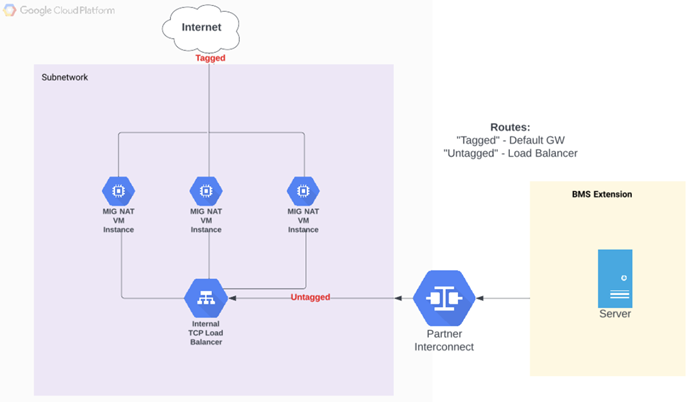
Internal load balancer MIG NAT diagram
The following resources are part of the NAT gateway and are created in order to provide internet connectivity for BMS servers:
- Compute engine instance template
- Managed instance group (MIG) from the above instance template
- Internal TCP load balancer (ILB) to route traffic to different instances in the instance group
Routes to direct traffic destined for the internet to the internal load balancer and from instances in the MIG to the internet use the default internet gateway.
Instance Template
An instance template is created with the configuration shown below. Some important points to note about the instance template:
- IP Forwarding is enabled on the primary network interface nic0.
- Custom metadata scripts are configured to allow for NAT functionality.
- The network tag internet-gw is applied. This tag is used to configure the routes.
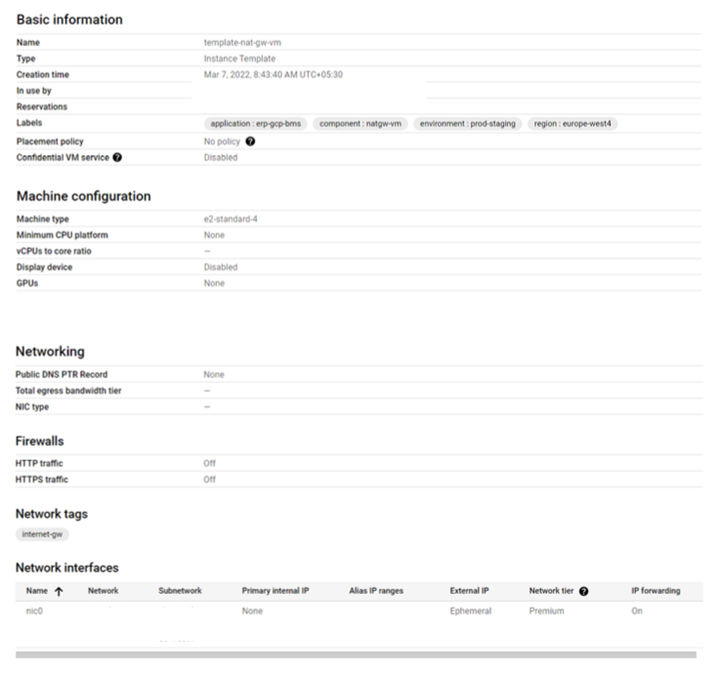
Instance template
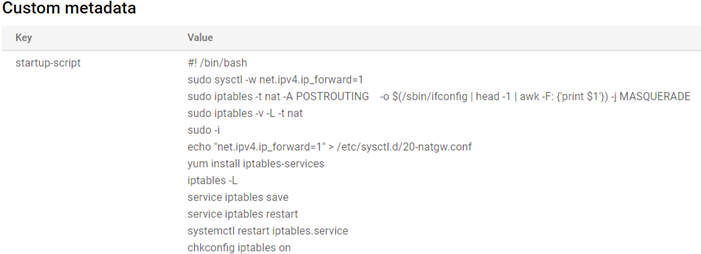
Custom Metadata
Managed instance group (MIG)
A regional managed instance group is created from the above instance template to support high availability and auto-scaling. Some important points to note about MIG:
- Auto-scaling supports 1-3 instances, depending on an average CPU utilization of 60%.
- Provides TCP health checks to monitor the health of instances.
Internal TCP load balancer
An internal TCP load balancer is created to distribute internet-bound traffic between different Google Compute Engine instances of the MIG.
Notes:
- All TCP traffic is allowed through the load balancer.
- Load balancer health checks are used to send traffic only to healthy instances in the MIG.
- Customer IP, port, and protocol are used for session affinity.
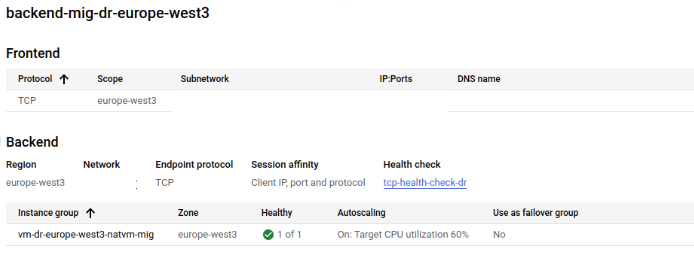
TCP load balancer
Route internet traffic through the on-premises network (alternative solution)
In this use, the customer is unable to leverage a custom NAT instance to route the traffic to the internet from BMS. However, there is an alternative solution.
For this approach, we can route traffic through Google Cloud VPN or Dedicated Interconnect to on-premise internet gateways.
That is, we can have the default route advertised to Google Cloud via the on-premise network, and we can further advertise this route via the partner interconnect to the BMS environment. This way, VM’s in the BMS environment can route to the internet via the on-premise network and customers can inspect the outbound internet traffic via their on-premise firewall solutions before routing the traffic out via their on-premise gateway.
DNS set up
The BMS environment does not have native DNS server capability within the BMS cloud, therefore we have chosen to implement the following design to serve DNS queries.
Architecture

DNS architecture
In this use, the customer wanted to direct all DNS queries from the BMS environment to their on-premise DNS servers.
They also had a requirement to use Private Google Access to access the storage APIs. For this purpose, there is a requirement to create a CNAME record for *.googleapis.com pointing to private.googleapis.com. However, due to technical constraints the customer was unable to create the necessary CNAME records within the on-premise DNS servers.
As an alternative approach we opted for a design in which we launch a pair of custom DNS server instances (Ubuntu/BIND) within Google Cloud, where we created a forward lookup zone with CNAME records for *.googleapis.com (these records are served locally from the DNS server instances) and configured DNS forwarding to forward all other DNS queries (wildcard) to on-premise DNS servers.
To learn more about setting up BIND DNS, refer to this Serverlab tutorial. If you would like to read more about configuring BIND DNS forwarding, this Digital Ocean tutorial is a great start.
Alternative design
An alternative DNS design approach is to forward all DNS queries to the customer’s on-premise DNS server from the Bare Metal Server VMs. That is, we would hardcode the on-premise DNS server IPs within the Bare Metal Server DNS configuration.
Network restrictions within the Bare Metal Solutions environment
While designing your network architecture for the BMS environment, please consider the following restrictions within that environment:
- No inherent connectivity to the internet for servers launched within BMS.
- No native firewall offered by Google Cloud within the BMS environment.
- No DNS capability within the BMS environment.
- It is not possible to directly connect to an on-premise environment from the BMS environment. We would need to connect the BMS environment to Google Cloud via a partner interconnect and set up the required network connectivity to on-premise via the VPC.
Conclusion
Careful thought and planning is always necessary in this kind of work. After reading this guide you should have an understanding of what BMS is and how it can be used to make it easy to migrate your database and its related apps to the cloud with minimal impact or interruption. Hopefully the walkthrough that we’ve provided will help you understand the process and start thinking about how this can work for you.
Additional reading:
##
To hear more about cloud native topics, join the Cloud Native Computing Foundation and the cloud native community at KubeCon + CloudNativeCon North America 2022 in Detroit (and virtual) from October 24-28.
ABOUT THE AUTHOR
Anoop works as a Senior Cloud Infrastructure Engineer at SADA and specializes in networking and security domains. Outside of work, he enjoys spending time in nature, hiking, and spending time with family.