By Mike Terhar
Kubernetes is being used for more than just scheduling containers to host production application workloads. As a generic compute and memory abstraction with network isolation and persistent storage, it can do a lot of stuff. One emerging use case is to run developer workspace images (aka development environment images) as pods. It’s breaking a lot of the classic “best practices,” but companies like Coder and GitPod have already proven its value in making developers’ lives easier.
There are several benefits to hosting developer workloads on Kubernetes ranging from cost-saving resource sharing to intellectual property boundaries. As Kubernetes brings more functionality to the platform, the developer workloads continue to gain capabilities. In this post, we’ll take a look at some of the advanced capabilities Kubernetes provides for powering up development environments.
The pieces that make it possible
Pods
When using Kubernetes to create developer workspaces, each workspace is a pod. The pod specification contains all of the information the scheduler needs to know to make the container run with the proper networking, storage, resource limits, image, environment variables, and secrets.
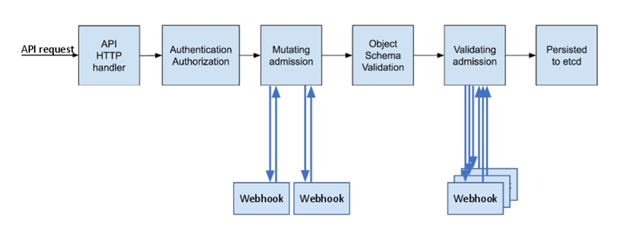
During scheduling, the pod goes through some evaluations that ensure the request is authorized and fits the allowed patterns. For a deeper dive on this, see the article where this diagram comes from. Our focus for this post is on the use of mutating webhooks: receiving inbound requests and making adjustments to them.
Webhooks
There are two types of webhooks in Kubernetes:
- Validation webhooks check to see if a request is allowed to happen. They’re responsible for preventing actions.
- Mutating webhooks are applications that take API requests as an input and output a slightly modified request.
Mutating webhooks are both incredibly powerful and incredibly dangerous. They can enable actions that the requestor may not realize are options. The baseline level of complexity is pretty high, despite some good templates existing. Since the webhooks stand in the way of inbound API requests, a buggy one could cause a lot of damage to the cluster.
Gatekeeper
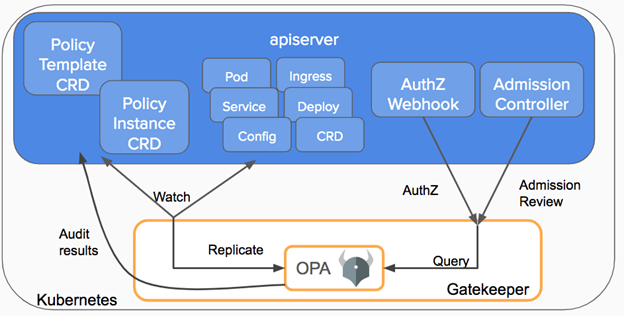
Gatekeeper is a handy webhook intermediary. It is a rock solid product from the Open Policy Agent folks that started off as a validation webhook abstraction. It takes a validation spec and interprets that for you rather than having to code it yourself, letting Kubernetes admins control the behavior of webhooks through yaml files.
As of Gatekeeper 3.4 there is an experimental mutation.yaml feature that can be installed which starts up the gatekeeper mutations controller and adds some custom resources to make assignments.
The recipe for a mutating resource spec is that it needs to be able to find the pods to mutate, see the fields that require mutation, and then have some new values to set.
Warning: take care with mutating pods
Just to be clear, this is a deviation from a core tenet of how Kubernetes has traditionally worked. Typically any time a pod spec is created, what goes in comes out exactly as defined. One could create a pod spec, apply it, and then validate that every field in the Kubernetes resource matched that of the file. This is no longer true when using a mutating webhook. Be sure not to mutate pods controlled by an operator or other mechanism that will detect the changes as erroneous and try to reset the specs.
Mutating developer workspace pods
With that background on Kubernetes and Gatekeeper behind us, let’s get into what we are really trying to do: make a developer’s life easier.
In Kubernetes developer platforms like Coder, the central workspace scheduler is asked to create a new workspace for a developer with some amount of storage, memory, CPU, etc via a workspace pod. Some include lower level items like labels, annotations, or node selectors. Since Coder allows multiple clusters to be used from a single instance, developers may choose a cluster close to themselves for lower latency or closer to a cloud or datacenter resource for better execution performance.
These variables are a subset of the Kubernetes pod spec for a reason: user experience! Developers want their IDE to run smoothly and their code to compile error-free. They don’t want to be in the business of selecting the right values for CPUs, memory, and worrying about costs or other variables. In an attempt to simplify the end-user experience, some flexibility is removed to reduce the cognitive load on developers.
For some of these values, it makes sense to configure them at the workspace template level or user-specific configurations. Others may apply to everyone on the whole system as a policy. These are evolving and each product in this space is finding their preferred mixture of flexibility and intuitive user experience.
The power of mutation
In the meantime, there are a chunk of very powerful options that don’t make sense to expose within the developer UI but are very helpful when certain patterns arise.
Below are a few examples of things a developer might want to do and how they could be addressed today.
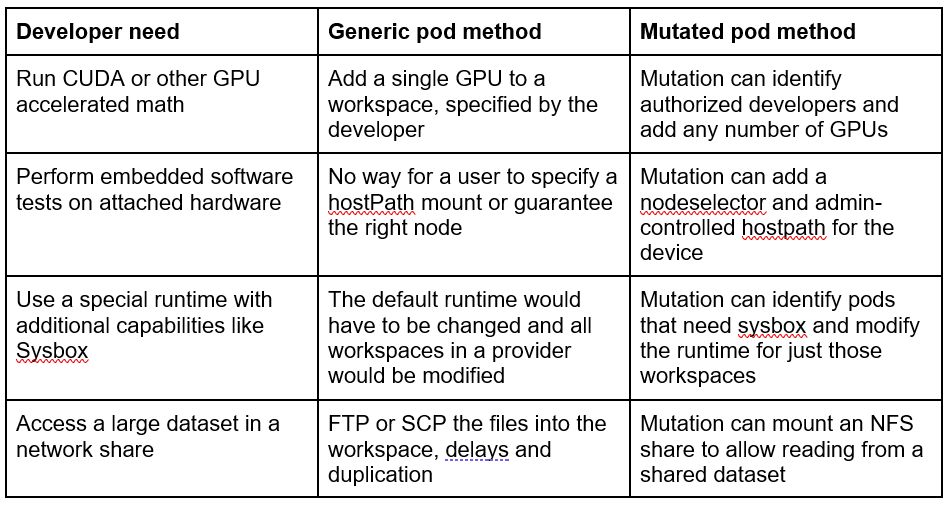
As you can see from the pattern here, the optionality may not be provided because of security, cost, or complexity. The need doesn’t go away just because the product has trouble surfacing the capability in a secure and intuitive way.
Webhooks can only be created and modified by a cluster administrator which means the developers aren’t given the ability to create arbitrary mounts or GPUs.
The scope for each of these examples is cluster bound, where something innate to the cluster’s hardware or network location almost provides a capability.
Example: Mount a shared volume
Let’s demonstrate how to use a mutating webhook to mount a shared volume so that a developer will be able to access a large dataset without having to copy it into their workspace.
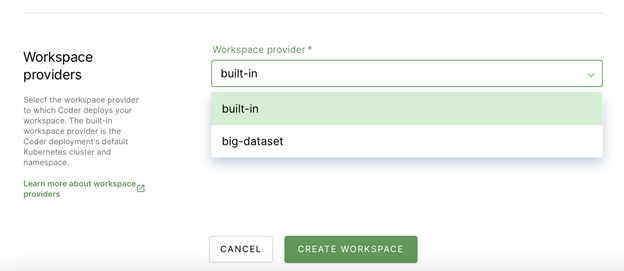
Assume the NFS server that contains the huge dataset exists in a datacenter or cloud VPC along with a kubernetes cluster. This cluster has a namespace configured as a workspace provider.
In the current state, the workspace pods can’t mount an NFS share and would need a cluster administrator to manually adjust the spec for any pods that need that mount. The dataset will need to be accessible via another file transfer protocol and copied to the workspace for processing.
First we need the NFS volume as a read, write, many volume:
“`bash
$ cat <<<EOT | kubectl create -f -n coder-big-dataset –
apiVersion: v1
kind: PersistentVolume
metadata:
name: nfs-pv
spec:
capacity:
storage: 1000Gi
accessModes:
– ReadOnlyMany
nfs:
server: nfs-server.domain.tld
path: “/big-dataset”
—
kind: PersistentVolumeClaim
apiVersion: v1
metadata:
name: nfs-pvc
spec:
accessModes:
– ReadOnlyMany
storageClassName: “”
resources:
requests:
storage: 1000Gi
EOT
“`
This ReadOnlyMany volume can now be mounted to as many pods as we make and they can all get to the data but can’t modify it.
To configure the mutation webhook, we have to follow the regular gatekeeper installation instructions and add the experimental mutations.yaml as well.
Then we run a command to create the Gatekeeper Assign resources in the coder-big-dataset namespace.
“`bash
$ cat <<<EOT | kubectl create -f -n coder-big-dataset –
apiVersion: mutations.gatekeeper.sh/v1alpha1
kind: Assign
metadata:
name: add-nfs-volume
spec:
applyTo:
– groups: [“”]
kinds: [“Pod”]
versions: [“v1”]
match:
scope: Namespaced
kinds:
– apiGroups: [“*”]
kinds: [“Pod”]
namespaces: [“coder-big-dataset”]
location: “spec.containers[name:*].volumeMounts[name:nfs-volume]”
parameters:
assign:
value:
name: nfs-volume
mountPath: “/nfs”
—
apiVersion: mutations.gatekeeper.sh/v1alpha1
kind: Assign
metadata:
name: add-nfs-mount
spec:
applyTo:
– groups: [“”]
kinds: [“Pod”]
versions: [“v1”]
match:
scope: Namespaced
kinds:
– apiGroups: [“*”]
kinds: [“Pod”]
namespaces: [“coder-big-dataset”]
location: “spec.volumes[name:nfs-volume]”
parameters:
assign:
value:
name: nfs-volume
persistentVolumeClaim:
claimName: nfs-pvc
EOT
“`
You’ll notice there are two mutations for this change. It’s because the location of the modifications is different. Each mutation runs before the pod spec is evaluated so they can individually be incomplete, as long as they ApplyTo/Match the same pods they’ll be aligned before validation.
Create a pod or a workspace to see the NFS share mounted to the `/nfs` path.
“`bash
coder(nfs-one) √
% df -h
Filesystem Size Used Avail Use% Mounted on
overlay 97G 14G 84G 15% /
tmpfs 64M 0 64M 0% /dev
tmpfs 7.9G 0 7.9G 0% /sys/fs/cgroup
nfs-server.domain.tld:/big-dataset 1000G 14G 986G 1% /nfs
/dev/sde 32G 62M 32G 1% /home/coder
tmpfs 7.9G 0 7.9G 0% /dev/shm
/dev/root 97G 14G 84G 15% /etc/hosts
tmpfs 7.9G 0 7.9G 0% /proc/acpi
tmpfs 7.9G 0 7.9G 0% /proc/scsi
tmpfs 7.9G 0 7.9G 0% /sys/firmware
coder(nfs-one) √
% exit
“`
Conclusion
This explanation and example are illustrative but not exhaustive. The types of problems that need to be solved vary from one organization to the next.
Mutating webhooks are a fantastic way to help a developer workspace gain access to some hardware or network specific capability that they would otherwise miss out on.
For more information on developer workspaces, check out https://coder.com and the code-server project at https://github.com/cdr/code-server.
##
To hear more about cloud native topics, join the Cloud Native Computing Foundation and cloud native community at KubeCon+CloudNativeCon North America 2021 – October 11-15, 2021
ABOUT THE AUTHOR
Mike Terhar, Customer Success, Coder