Gaming PCs need good security to protect data and keep performance strong. Online threats increased by 40% in the past few years. So protection matters more than ever. From installing the right software to limiting access, a few steps can make a big difference. Let’s look at easy ways to secure your gaming PC without sacrificing performance.
Picking Your Ideal System
Choosing your ideal gaming PC involves many factors. The specs should not only meet your gameplay needs but also offer good security features. It’s wise to pick a system with pre-installed cybersecurity tools.
A fast processor and a powerful graphics card form the base of a great setup. But strong hardware alone is not enough. Reliable software also matters a lot. For instance, the best antivirus for gaming PC will also play a key role. Choose a reputable brand that offers decent security features and keeps your data safe.
Look for systems with encryption capabilities to secure your data. Some PCs come equipped with built-in firewall options, which help ward off threats. Such features bolster security without hurting performance.
User access control is another vital aspect. Systems allowing multiple user accounts give flexibility and keep sensitive data safe. Parental controls may also prove useful in family settings. Consider also regular software updates as part of the package. Frequent updates fix vulnerabilities and improve both security and performance over time.
Regular Updates for Software
Regular software updates keep your gaming PC safe and running well. These updates fix bugs and enhance overall performance. Here are some key points to consider:
- Bug fixes. Developers release updates to address bugs that may cause issues in games or applications;
- Security patches. Frequent patches protect your system from new threats and vulnerabilities;
- Compatibility. Updates ensure that games and apps run smoothly with the latest hardware and software;
- Performance boosts. New features or optimizations can enhance system speed and efficiency.
- Driver updates. New versions of drivers often improve hardware function and stability;
- Enhanced features. Updates can bring fresh functionalities that improve user experience;
- Software compatibility. Older programs may not work well with newer systems without updates.
Secure Passwords and Accounts
Strong passwords form the first line of defense for any gaming PC. A simple method is to use a mix of letters, numbers, and symbols. Length also matters; a longer password tends to be more secure.
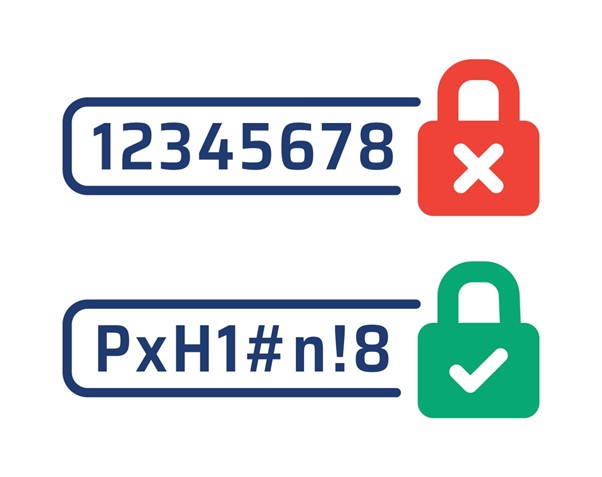
Changing passwords every few months helps in keeping accounts safe. Avoid using the same password for different sites or apps. Two-factor authentication (2FA) adds another layer of security. This feature asks for an extra code sent to your phone or email.
Storing passwords can pose risks. A password manager offers a safe way to keep track. Look for one with strong encryption features to protect your data.
Firewalls and Network Security
Firewalls act as a barrier between a PC and unwanted traffic. They watch the data that comes in and goes out, blocking threats. A good firewall helps keep hackers away from your information.
Many PCs come with built-in firewalls. It’s always better to switch these on for added safety. Software firewalls offer extra features for more control.
A strong home network boosts security too. Securing the Wi-Fi with a strong password makes any attacks harder. Changing the default name of the router’s network can add another layer of protection.
Using a Virtual Private Network (VPN) adds encryption to the internet connection. This stops others from seeing sensitive data while gaming online. Reading up on network settings and tools can help you make smart choices for better security without hurting performance.
Backup Important Files
Backing up files helps keep important data safe. Losing games, progress, or documents can be a hassle. Backups save a lot of trouble if something goes wrong. Here are some simple ways to back up files:
- External hard drive. Fast and simple, just plug it in and transfer files;
- Cloud storage. Services like Google Drive or OneDrive keep files online;
- USB flash drives. Small and portable, fits right in a pocket;
- Network-attached storage (NAS). Store files on a home network, accessible from any device;
- DVDs/Blu-Rays. Good for extra copies of key data.
Make it a habit to backup every week and check all backups to see if they work well. This helps avoid issues when files are needed later.
Safe Downloads and Installs
Safe downloading and installing on your gaming PC keeps threats at bay. It is best to download games from trusted sources like official websites or popular stores such as Steam or GOG. Avoid third-party sites that offer cracked versions of games as these often come with malware.
Before you install any game or software, read reviews and check ratings to see if other users report issues. Scanning each file with antivirus software before opening adds a layer of safety. It is useful to keep your antivirus updated for better protection.
Pop-ups and ads that offer quick downloads might seem tempting but steer clear of them. These can be traps loaded with harmful software. Keep an eye out for small changes in filenames or extensions; they are often signs of danger.
Final Words
Keeping a gaming PC safe does not have to hurt performance. A few smart steps can help a lot. Regular updates, strong passwords and safe downloads matter. Using firewalls and VPNs adds more layers of safety. These tips help make sure your gaming stays fun and secure.
##