
By Michael Sparre, Founding Engineer at Grepr
Four practices for running stateful streaming on Kubernetes after the quickstart
One Flink streaming job on Kubernetes is easy. Dozens are a different problem. Each one holds state, needs upgrades, and falls behind at its own pace, and none of them can stop while you work on it.
Once those jobs matter, the questions come fast. How do you update a running job without losing its state? Why did adding TaskManagers not bring lag down? What happens to a running job when its node is consolidated? The Flink Kubernetes Operator gives you the building blocks, but it doesn’t answer these on its own.
More teams face these problems each year, as real-time features and AI workloads push stateful streaming onto Kubernetes.
A common setup gives each data pipeline its own Flink job on Kubernetes. With many jobs running, four practices make the biggest difference.
1. Wrap the Flink operator in a control layer
The Flink operator does one job very well. It takes a FlinkDeployment resource and makes the pods, savepoints and upgrades match it. It does not know what a pipeline means on your platform, or what a safe change looks like for your users. The fix is a second, thin operator on top of it.
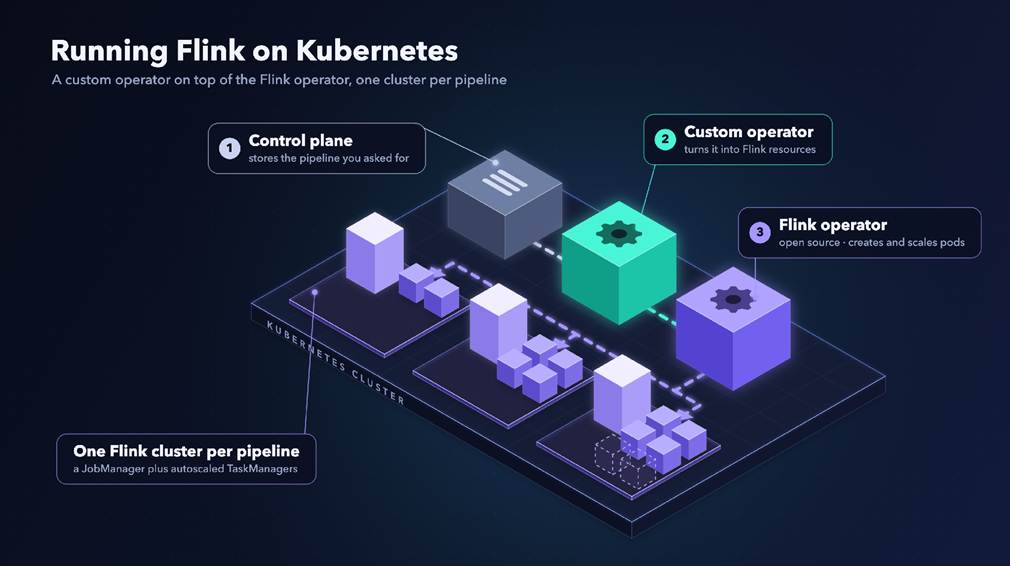
A custom operator sits on top of the Flink Kubernetes Operator, which runs one Flink cluster per pipeline.
A deploy moves through three steps:
- The control plane saves the user’s pipeline in its database and writes it to the cluster as a custom resource.
- The custom operator reads that resource and manages two standard Flink resources through every change: a FlinkDeployment for the cluster and a FlinkSessionJob for the job.
- The Flink operator creates the JobManager and TaskManager pods. Its autoscaler changes parallelism from job metrics.
Why not let the control plane write Flink resources directly? A dedicated operator keeps lifecycle policy in one reconcile loop and keeps retrying when the control plane is down. If either operator stops, running jobs keep processing data. Only changes wait.
The custom operator decides what should run and when a change is safe. The Flink operator handles how it runs, including savepoints and pods, so none of that gets rebuilt. A few lessons apply to any operator built on top of another:
- Leave status out of your diff. Two controllers write to the same resources. If your operator compares whole objects, status included, it fights the other operator forever. Compare only the fields you own.
- Order deletes on purpose. Finalizers across two operators can deadlock. Delete the job before changing the cluster under it.
The cost is one more controller to own and upgrade. The deciding factor is not the number of jobs. If your platform creates, updates or deletes jobs for its users, that lifecycle logic must live somewhere, and the control plane is rarely the best place for it. If a team manages a few static jobs by hand or through GitOps, the Flink operator alone is enough.
2. Make every change a safe restart
A savepoint is a consistent snapshot of a job’s state that Flink can restart from. Almost every production change is a restart from a savepoint, so restarts must be rare, cheap and predictable.
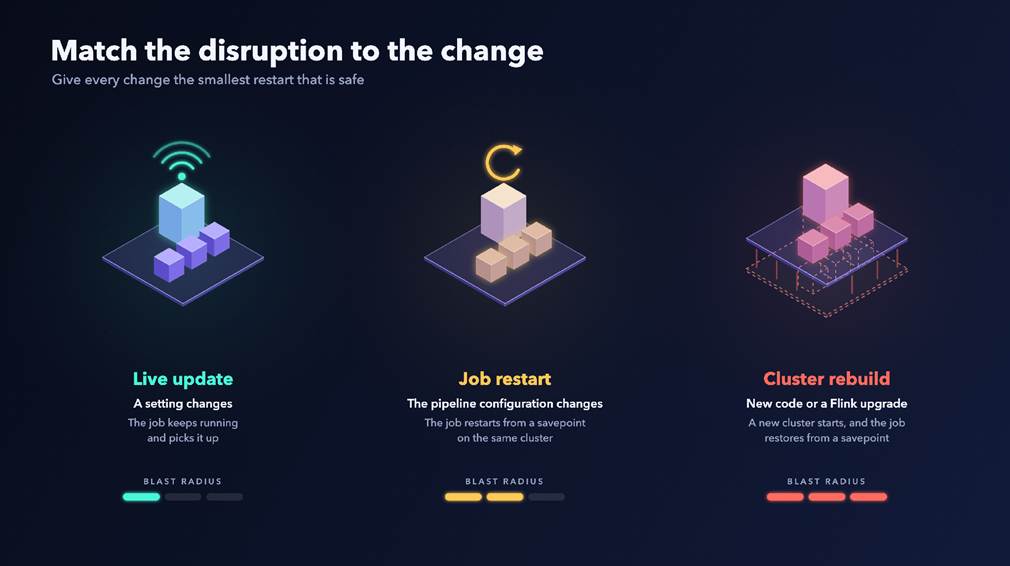
Each kind of change restarts more of the system. The custom operator picks the smallest restart that is safe.
- Match the disruption to the change. Sort each change by the smallest restart it needs. Some settings need no restart at all: the job polls the control plane for them and applies them while it runs. A pipeline configuration change restarts only the job, from a savepoint. New code or a Flink upgrade rebuilds the cluster. Each class gets its own state machine in the custom operator that manages the update.
- Put a deadline on every change. A change that has not finished within a few minutes is stuck. Mark it failed and alert, instead of waiting forever.
- Roll back automatically. When a change fails, return the pipeline to its last stable version and restore it from the savepoint taken before the change.
3. Scale on the right signal
When a streaming job falls behind, the first instinct is to add pods where CPU is high. The Kubernetes Horizontal Pod Autoscaler does exactly that by default. In a streaming job, that is often the wrong place.
CPU misleads for two reasons. The first is backpressure: when one stage is slow, every stage before it waits for buffer space and looks idle. The second is that the stage that caps throughput often uses little CPU. A sink that waits on a slow database can be busy all the time at almost no CPU, while the heaviest compute stage shows the highest CPU. A CPU-based scaler adds pods there.
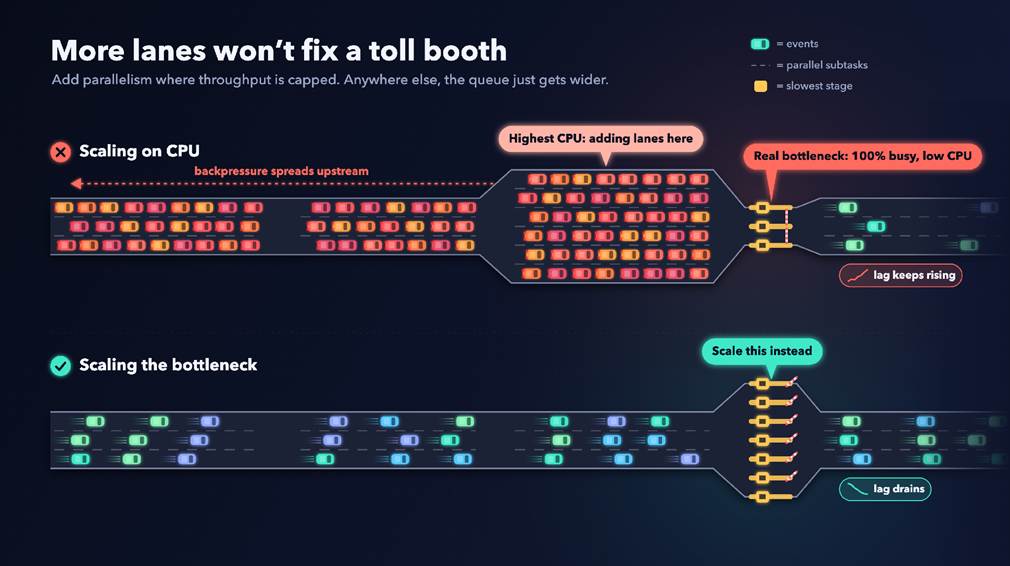
Scaling on CPU adds capacity to the busiest-looking stage. Scaling the actual bottleneck is what drains the lag.
Scaling on source lag, for example with KEDA, is a step up. It shows that the job is behind, but not which stage to scale. Better signals come from Flink itself:
- Busy time per stage. Flink reports how much of each second a subtask spends busy, backpressured or idle. Time spent waiting on I/O counts as busy, so busy time finds the slow sink that CPU hides. The Flink autoscaler uses it to estimate each stage’s true processing rate.
- Backpressure. The bottleneck is the first busy stage whose upstream stages are backpressured.
A reasonable autoscaler starting point in the FlinkDeployment spec:
flinkConfiguration:
job.autoscaler.enabled: “true”
job.autoscaler.target.utilization: “0.75”
job.autoscaler.metrics.window: “3m”
job.autoscaler.stabilization.interval: “2m”
job.autoscaler.scale-down.interval: “10m”
job.autoscaler.scaling.effectiveness.detection.enabled: “true”
Scaling out helps when the bottleneck is CPU-bound work with evenly spread keys, or when a backlog builds after an outage. More parallelism does not help in four common cases:
- Hot keys. If one key gets most of the traffic, one subtask does most of the work. New subtasks sit idle.
- Too few source partitions. A source cannot use more subtasks than it has partitions. Add partitions first.
- A saturated external system. If the database behind the sink is at its limit, more sink subtasks only add load. Scale the sink only when the system behind it has room.
- Memory pressure. If TaskManagers spend their time in garbage collection, fix heap and state size first.
4. Size resources for how jobs scale
- One task slot per TaskManager. Each unit of parallelism becomes one pod, so scaling is easy to reason about and to pack onto nodes. The cost is more JVM overhead than a few large TaskManagers.
- A dedicated node pool for Flink. Let those nodes consolidate only when they are empty, so the cluster autoscaler never evicts a running TaskManager to save money.
Every rescale is a restart. The job stops with a savepoint, restarts from it at the new parallelism and must catch up. If the autoscaler changes parallelism too often, the restarts cost more than they save. Use a short metrics window, a stabilization period after each change and a longer wait before any scale-down. It also helps to bring up the new TaskManagers before the job stops, so Kubernetes schedules the pods and nodes while the old job keeps processing. The restart then waits only for the job, not for infrastructure.
Where this is headed
The Flink operator is a strong foundation, not a full platform. Build a thin layer on top that owns your policy, and make restarts rare and cheap. Then scale on busy time and backpressure, not CPU.
Expect autoscaling for stateful workloads to keep moving in this direction: away from CPU and memory, and toward workload signals like busy time, backpressure and lag.
KubeCon + CloudNativeCon is taking place in Salt Lake City from November 9 to 12. Register Now!
##
ABOUT THE AUTHOR

Michael Sparre is a Founding Engineer at Grepr, where he builds distributed stream processing systems. He designed and built the custom Kubernetes operator that runs Grepr’s Apache Flink pipelines.