Written by Limor Wainstein
Cloud Computing Costs – An Overview
Cloud computing services allow businesses to redistribute upfront costs for hardware and software by spreading these expenses over a period of months to a few years. However, these costs will eventually catch up to your bottom line. The fact is that cloud computing costs can, over time, match and perhaps surpass a business’ upfront costs.
Essentially, there are three cost pillars that contribute to the overall cost in a cloud environment-
- Network: Cost per Rack Unit – When setting a price, cloud service providers determine the expense to maintain a particular network. They do this by factoring in costs for network hardware, infrastructure, maintenance, and labor. These costs are added and then divided by the number of rack units needed by a business for its IaaS cloud.
- Compute: Cost per GB of Virtual RAM – Each individual organization has a specific requirement set including the use of CPU. Most cloud service providers determine an organization’s cost by factoring –
- Hardware Operation – Total amount of virtual RAM deployed in public clouds. Costs may include licensing and usage-based subscription costs.
- Hardware Acquisition – The cost incurred by the cloud service provider to acquire hardware for each GB of virtual RAM used by the organization. These costs are often depreciated based on the lifecycle of the hardware.
- Storage Cost: Cost per GB of Virtual Disk – Storage costs are similar to compute costs. The cloud service provider calculates this by determining the cost of operating your storage hardware and acquiring new hardware for your storage needs. There is also an aspect of Shared Costs here
- Shared Costs – Your quote also usually includes a share of the cost to power and cool the underlying infrastructure for the IaaS platform in the data center. It can also include costs of software licenses, hosting and various other service areas. However, sharing these cost heads with other organizations is what makes using the public cloud cost effective.
Cloud Pricing Models
Before we get to specific cloud pricing models followed by the top cloud providers, let us look at some of the generic pricing models that cloud service providers can subscribe to.
Pay as You Model
Customers are charged based on their usage and consumption of a service. This increases cost awareness and leads to more efficient and selective usage, which, in turn, results in less wastage and lower costs.
Subscription Based Pricing
This is perhaps the simplest pricing model where customers are billed a fixed monthly cost. This model does not consider actual usage
Spot Pricing
Market forces tend to govern the spot pricing model. It was introduced by Amazon for its EC2 service. When demand is high, costs go up and conversely, costs are reduced when demand drops
Cloud Chargeback
This is an IT cloud computing term and refers to the costs charged for delivering cloud computing services for businesses using different cloud-based services. The cloud chargeback model can be equally effective for either private or public cloud as well as for hybrid cloud services.
Moving on to a brief overview of the pricing models offered by the top three cloud service providers – Amazon Web Services, Microsoft Azure, and Google Cloud Platform.
Amazon Web Services
AWS offers three basic pricing buckets – compute, storage and outbound data transfer. These three buckets can vary to a certain degree depending on the AWS product and pricing model your organization chooses. Usually, AWS does not charge for inbound data transfer.
For compute resources, there is an hourly charge starting at the time a resource is launched till the time it is terminated. This is unless a reservation has been made, in which case, the cost is pre-agreed. For data storage and transfer services, the charge is typically per GB.
Depending on the different product your organization uses, AWS offers different pricing models.
- On-Demand Pricing – Pay for compute or database capacity with no long-term commitments
- Dedicated Instances – Workflows run in a Virtual Private Cloud (VPC) on dedicated hardware
- Spot Instances – Purchase spare computing capacity at a discounted hourly rate.
- Reservations – Avail a higher discount of up to 75% by paying for capacity ahead of time. Reservation options include –
- Amazon EC2 Reserved Instances
- Amazon DynamoDB Reserved Capacity
- Amazon ElastiCache Reserved Nodes
- Amazon Relational Database Service Reserved Instances
- Amazon Redshift Reserved Nodes
Amazon’s pricing page has more details about the pricing of various Amazon products and services. To keep track of Amazon pricing, you can use Amazon’s pricing tools and/or third-party tools like NetApp’s AWS Calculator, Atlassian Cloud Pricing Calculator etc. to keep track of pricing.
Microsoft Azure
Microsoft Azure provides flexible purchase and pricing options for most of the cloud services it provides. Some highlights include –
- No Upfront Costs
- Pay for What You Use
- Free Cost Management Tools
MS Azure also provides three basic areas you can use to save on your cloud services cost.
- Reserved VM Instances – Save up to 72% on a pay as you go model, but with a one or three commitment. However, this can be changed or canceled at any time.
- The Hybrid Benefit – Leverage your on-premise Windows or Linux Server licenses with Software Assurance for a sizable saving when migrating select workloads or entire datacenters to the cloud.
- Dev/Test Pricing – Azure offers discounted rates for ongoing development and testing. This includes no MS software charges on Azure VMs and special dev/testing pricing on other Azure services.
The table below has some pricing examples for some of the more popular Azure products.
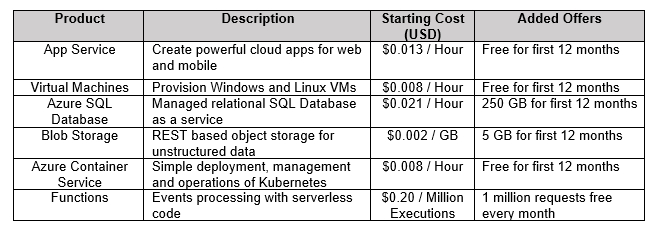
To know more, head to Azure’s price model page.
Google Cloud Platform
Google Cloud Platform declares that its pricing models are, at an average, 60% less than many of the compute workloads when compared to other cloud service providers. Its ‘Customer Friendly Pricing’ is based on three fundamentals –
- No Upfront Costs – Organizations do not need to provide long-term commitments while enjoying $0 upfront investment
- Pay-As-You-Go – Organizations pay for services on an ‘as-needed’ basis thereby saving costs and focusing more on innovation.
- No Termination Fees – There are no termination costs involved when discontinuing a service. Organizations stop paying for a service the minute they turn off the service.
Some of the ways Google Cloud has attempted to innovate its pricing structure is by offering the following advantages to its users –
- Sustained Use Discounts – Applied automatically where 30%-off workloads that run for a major part of the billing month on Compute Engine or Cloud SQL
- Preemptible VM Instances – Up to 80%-off workflows can be interrupted including data mining and processing
- Per Second Billing – Pay per second of usage
- Custom Machine Types – Organizations can pick a CPU configuration and memory to save up to 50%
- Committed Use Discounts – Savings of up to 57% without any upfront fees.
- Rightsizing Recommendations – The ability to compute sizing recommendations based on an organization’s usage.
More on Google Cloud pricing per product or service can be found on the official GC page.
Top Cloud Cost Optimization Tools
There are a number of tools in the cloud ecosystem that can be used to optimize the costs of using the services of different cloud service providers. The more popular ones are listed below-
Cloudability
Cloudability is a popular SaaS that provides a wide range of tools that be used in a number of areas to help optimize your cloud subscription cost. It comes with a 14 day free trial period.
CloudCheckr
CloudCheckr focuses on assets that need to be tracked and ensures efficient usage. It displays results visually and highlights areas of concern like mismatches between usage and amount provisioned for. It also makes recommendations based on your organization’s usage history.
Spotinst
Spotinst is a robust cloud service management platform that organizations can use to reduce up to 80% of their cloud services costs. It allows organizations to leverage excess capacity without any negative effect on availability.
Cloud Cruiser
Cloud Cruiser is another tool that traces assets and provides a UI through which a number of actions can be taken based on the usage information gathered. In addition to checking usage, it also allows administrators to set thresholds and sends out alerts as a particular threshold is in danger of being breached.
CloudHealth
CloudHealth provides a one-stop-shop to analyze and manage cloud cost, usage, security, and performance. It allows organizations to automate costs, resources and governance policies when it comes to cloud-based services.
##
About the Author

Limor is a technical writer and editor at Agile SEO, a boutique digital marketing agency focused on technology and SaaS markets. She has over 10 years’ experience writing technical articles and documentation for various audiences, including technical on-site content, software documentation, and dev guides. She specializes in big data analytics, computer/network security, middleware, software development and APIs.