By Nicolette Carklin, Parallels
VMware Software-Defined Data Center (SDDC) is considered by many as the next phase in the evolution of cloud computing and virtualization technologies. By enabling a fully automated, zero-downtime virtual desktop infrastructure (VDI) for any hardware and any application, VMware SDDC is evolving to replace traditional servers, networks and storage devices.
What is SDDC?
SDDC refers to a datacenter whose entire infrastructure (server, network and storage) is virtualized and delivered as a service. In an SDDC environment, a software layer is added to hardware configuration to orchestrate the management of computing, storage and networking services.
Benefits of SDDC
When companies outgrow their datacenters and need greater capacities, an SDDC approach can cut costs, gain efficiencies and increase scale.
- Improves efficiency and resiliency
SDDC offers a stable and more flexible platform for any VDI deployment, complete with innovative services such as high-performance computing, big data and latent-sensitive apps. It automates the provisioning and management of resources; as such, you’re in a better position to make any changes to the server, networking and storage resources. - Extends private, public and hybrid cloud capabilities
When you virtualize, you turn the server, storage and networking resources into programmable resources. Consequently, you can manage and control them with a program and link them up with other virtualized resources. You’re not only limited to the server room, but you can also extend your SDDC to private, public and even hybrid cloud services. - Automates infrastructure and app delivery
Conventional data centers are siloed, meaning you need to deploy and update applications separately. This is a tedious and time-consuming process. SDDC virtualizes all the resources within the datacenter into a single pool. With such an infrastructure, you can define role-based policies to allow your end-users to access their preferred applications based on their levels of privilege. - Enhances security
Defining security for distributed applications is becoming increasingly complex because of a lack of a single point between the traditional datacenters and applications. With SDDC, you can secure information assets by natively applying policies at the virtual machine (VM) level in a manner that is application- and data-centric.
How VMware implements SDDC
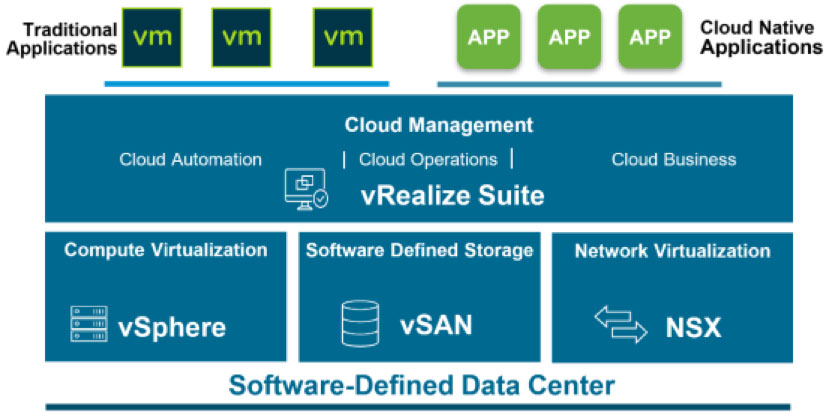
VMware SDDC is a fully integrated stack of hardware and software and consists of four components:
- vSphere: Provides compute virtualization
- vSAN: Provides storage virtualization
- NSX: Provides networking virtualization
- vRealize: Provides extra management, automation, self-service, intelligent operation and financial transparency for both traditional and cloud-based application workloads
Source: infohub.delltechnologies.com
A VMware SDDC is implemented with several unique factors as compared to conventional data centers. First, the entire SDDC infrastructure is fully virtualized-servers, networking and storage devices are abstracted via a software platform. By virtualizing the entire infrastructure, SDDC not only decouples workloads from the resources but also simplifies the configuration, management and consumption of datacenters.
Secondly, SDDC’s vRealize automates operations, simplifying governance while providing more business insights through cloud computing capabilities. Unlike traditional data centers, the cloud management platform is customized and integrated into whole virtualized services to orchestrate provisioning, management and monitoring of services across the entire SDDC environment.
How Parallels RAS integrates with the VMware infrastructure
When deciding to set up desktops across private, public or hybrid clouds, you need to consider many factors such as servers, networking, storage and virtualization. VMware SDDC can significantly enhance IT performance and efficiency, and Parallels® Remote Application Server (RAS) can help you simplify desktop setup across private, public or hybrid clouds.
Parallels RAS supports VMware ESXi and VMware vCenter, which offer explicit access and control of underlying SDDC resources. As such, you can easily partition hardware and amalgamate applications and minimize costs. When implementing VDI, Parallels RAS can help you manage VMs from different hypervisors under the same SDDC environment.
If you’re thinking of integrating a private and public cloud using SDDC to generate a truly hybrid cloud platform, Parallels RAS can help you seamlessly integrate the entire infrastructure that spans both on-premises and off-premises environments with a standardized orchestration, management and security framework.
Realize the benefits of VMware SDDC by downloading a 30-day trial of Parallels RAS!