A fast and efficient WordPress website is crucial for success in today’s digital landscape. The hosting server automatically becomes extremely important in defining the performance scale of your website, whether it is used to run your blog, e-commerce store, or corporate site. Furthermore, by powering their WordPress websites, refurbished hardware has become an affordable alternative for people to make a compromise between performance and financial restraints.
Let’s explore some of the primary factors that will affect how well WordPress performs on your hosting server and examine some optimization techniques for your website. Remember that, with the right setup, even refurbished hardware can produce remarkable results.
1. Server Uptime and Reliability: The Foundation of Availability
The server uptime of a hosting company refers to the period in which a user can access your website. It will directly affect the availability of your site and performance. Therefore, the high uptime rate is considered a key indicator of hosting dependability.
Refurbished Supermicro servers can make a significant difference due to their enterprise-grade reliability. These are thoroughly tested and certified servers that promise the best performance standards but are more budget-friendly.
Using a refurbished supermicro server will give you excellent uptimes with great performance for your WordPress site at a much more reasonable rate, hence being economical for businesses on a tight budget without compromising on quality hosting standards.
The Impact on User Experience
Server reliability directly affects user trust and engagement. Consider this eye-opening statistic:
40% of online shoppers abandon a site that takes more than 3 seconds to load.
This highlights the critical relationship between server uptime and user retention. Every second of downtime could mean lost opportunities and revenue for your WordPress site, emphasizing the importance of robust server hardware.
2. Server Location: Bridging the Distance for Speed
To achieve optimal speed, it is crucial to understand how server location affects your WordPress site’s performance. Thus, regardless of whether you employ new or used hardware, the farther away your server is from your users, the longer it will take for your website to load.
Key Takeaways: Having a server closer to your audience allows you to reduce loading time.
Latency Reduction Strategies
The following strategies can be used to reduce latency caused by distance:
- Bring the servers closer to the audience.
- Use Content Delivery Networks.CDNs can reduce load times for users far from your primary server.
SEO Benefits of Faster Loading Speeds
Google stated that site speed is a ranking factor. This includes not just optimizing your server location and hardware, but also improving user experience, which will increase your WordPress site’s exposure and attract more traffic.
3. Server Resources: The Powerhouse of Performance
The resources available on that server are just as important as the location of that server, which sets the stage for speed. Let’s explore how RAM, CPU, and bandwidth play into your WordPress site’s performance, remembering that even refurbished servers provide quite substantial resources.
RAM and CPU: Processing Power
Adequate RAM and CPU resources are what handle traffic efficiently and process requests with speed. These resources are extremely important as your WordPress site grows in terms of visitors. Refurbished enterprise-grade servers have lots of processing power for most WordPress sites.
Bandwidth: How Fast Data Flows
Bandwidth is the amount of data your server can transfer at any given time. A WordPress site heavy with media needs enough bandwidth to make sure that there is no slowdown in execution.
4. Choosing the Right Hosting Type for Your WordPress Site
Understanding server resources naturally leads us to discuss different hosting types. The hosting type you choose can significantly affect your WordPress website’s performance. Let’s compare the options:
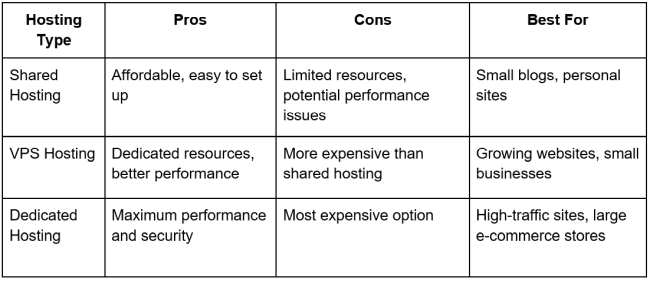
Remember: As your WordPress site grows, you may need to upgrade your hosting type to maintain optimal performance, potentially considering dedicated servers (new or refurbished) for maximum control and resources.
5. Server Software and Technology: The Backbone of Speed and Security
The software and technology your server utilizes is equally important as the hardware itself. Now let’s dive deep into how other aspects of the server hardware have an impact on WordPress performance.
Web Server Software
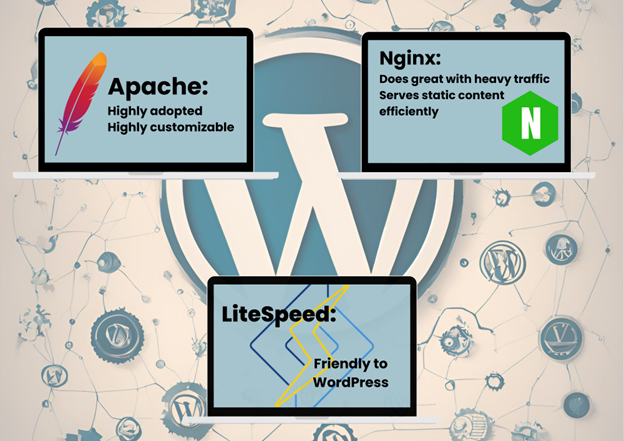
The usual suspects are Apache, Nginx, and LiteSpeed. Each of them excels at something:
PHP Versions and WordPress
Keeping your PHP version up to date means a lot for WordPress in terms of performance and security. Quite often, new PHP versions bring huge speed enhancements and security improvements to your server hardware.
SSL and HTTPS: Security Meets SEO
Setting up SSL certificates provides security to your WordPress site, but at the same time, adds some SEO advantages. Google loves secure sites, and so it gives more ranking advantages to HTTPS-enabled websites.
6. Caching Solutions: Turbocharging Your WordPress Site
Now that we have covered some of the base aspects of hosting, let’s explore how caching can kick it up a notch to complement the capabilities of your server.
- The addition of server-side caching with the introduction of Varnish greatly amplifies the performance and load times of your WordPress website, putting your server to good use.
- By allowing browser caching, return visitors will face less load time, therefore increasing user experience.
Pro tip: combine server-side caching with WordPress caching plugins, whether you want optimum performance for whatever server hardware you are running.
7. Monitoring and Maintenance: Keeping Your WordPress Site in Top Shape
To maintain peak performance, ongoing monitoring and maintenance of your hosting server are essential, especially if you’re using refurbished hardware.
Regular Monitoring
Continuously monitor your server’s performance to identify and resolve issues promptly. Use tools like:
- New Relic
- Pingdom
- Google PageSpeed Insights
Routine Maintenance
Implement these best practices for server maintenance:
- Regular software updates
- Security checks
- Database optimization
- Backup creation and testing
By staying proactive with monitoring and maintenance, you can ensure your WordPress site remains fast, secure, and reliable, maximizing the lifespan and performance of your server hardware.
Conclusion
Your hosting server is literally the backbone of your WordPress website, and everything about it affects your site’s overall performance. Whether it is a case of how much uptime and where it’s located, to how many resources and software are being used, your website’s speed depends on them, along with the overall reliability too. The basic principles of optimization remain the same whether the hardware used is new or refurbished.
By carefully considering each of the factors discussed and applying the suggested optimizations for yourself, you can do much to enhance the performance of your WordPress website, leading to better user engagement, improved SEO rankings, and ultimately, greater success for your online presence.
Frequently Asked Questions
1. How does the type of hosting plan affect my WordPress website’s performance?
The hosting plans determine how your website would be apportioned server resources. Shared will most probably slow your site down since you share resources with other websites, while VPS and dedicated hosting result in further implementation and more dedicated resources, hence improving performance and reliability, especially for high-traffic sites.
2. What does server location have to do with the loading speed of my WordPress site?
The location of the server impacts the distance your data has to travel between it and your website visitors. A server closer to your target audience reduces latency and loading times, which in turn can improve user experience and even positively affect SEO rankings.
3. If I’m on shared hosting, how might I improve performance on my WordPress site?
Caching plugins, image, and file optimization, few plugins and scripts third-party services like CDNs distribute content across different locations. Once that becomes insufficient on shared hosting, it is time to upgrade to VPS or a dedicated server, where inexpensive refurbished enterprise-class hardware can yield surprisingly better performance.