By Prashant Ketkar, CTO at Parallels
Whether in Dallas, Dublin or Dubai, app and desktop delivery solutions – such as VDI, DaaS, App streaming or other virtualization offerings – have become the standard for giving remote and hybrid workers the flexibility of using any device with the knowledge their applications and data will be consistently available.
But as organizations expand these environments, virtualization costs are coming under renewed scrutiny. At a time when IT leaders are weighing VDI investments against competing priorities like AI, understanding the true cost of these platforms has become a critical budget decision.
Beyond the Tip of the Iceberg
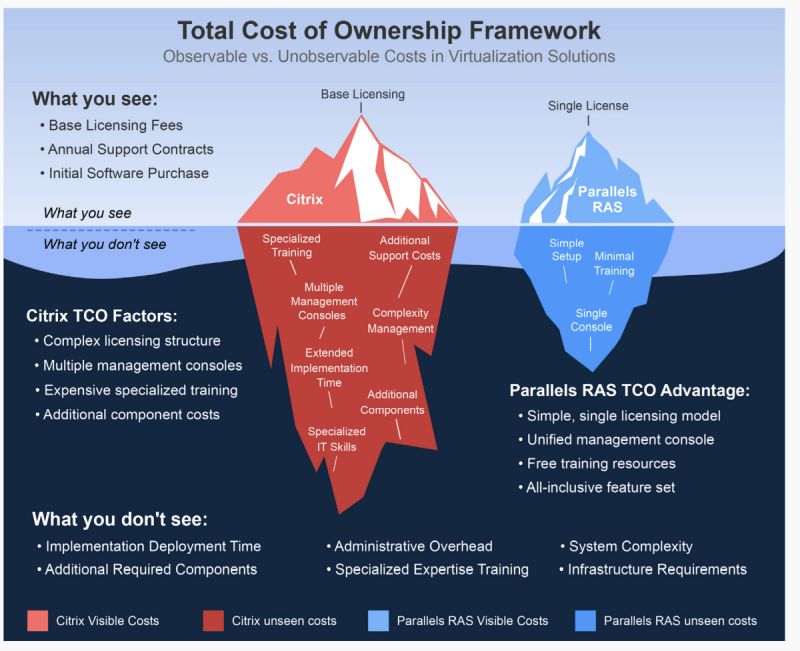
Evaluating the total cost of ownership (TCO) is like looking at an iceberg. What is below the surface can significantly affect per-user cost. TCO involves more than just licensing expenses. Many underlying operational and support-related expenses can represent a much larger share of the overall investment, and impact resource allocation over time. Licensing may also have additional costs below the surface.
A complete TCO analysis should include a deeper comparison of licensing models and a review of major cost drivers, and which components contribute the most to total cost.
Appraising Licensing Models
Licensing agreements range from an on-premises model to a universal one that accommodates all environments, including public clouds. Ideally, a universal model that carries a single license and can be managed via one console will cut down on complexity and staff time. Additionally, to get a complete picture of licensing costs, be aware of add-ons like component licenses, support fees, renewal expenses and variable pricing due to deployment models. This will provide a more accurate per-user cost when evaluating VDI providers and new or renewed licensing agreements.
A Cost Driver Checklist
The hidden costs can vary depending on factors like the skill level within an organization, simplicity for the end user or whether the organization is using several licensing models. By identifying major cost drivers and determining which components contribute the most to total cost, a business will have greater clarity on the true cost.
Cost drivers include:
- Infrastructure requirements. If an organization has cloud-based VDI, or is considering migrating to cloud VDI, all related compute, storage, and networking costs need to be part of TCO. Other items include physical or virtual servers, networking and storage requirements for VDI components. With this data, businesses can more accurately gauge the proportion of infrastructure costs related to a VDI license model.
- Administrative overhead. VDI system management, maintenance, monitoring, and support consumes staff time that is often untracked. By allocating hours spent on these tasks against IT staff hourly rate, a clearer view of staff time and costs will emerge. Staff tasks can include troubleshooting, patch management, user profile updates, and multi-console management.
- Expertise and training investments. Costs can easily mount if a provider requires certain specialized training and certification. Hiring staff to fill the knowledge gap, or external consultants to manage virtualization projects will be high-priced. Some providers do offer free training to alleviate these costs, and training may be straightforward enough for existing staff.
- Implementation and update costs. The clock starts ticking the very first day of implementing VDI so these hours must be factored into cost analysis. If the virtualization provider has a simple setup with easy configuration, businesses save staff hours. If not, system complexity will drive up costs. Long term, upgrades are a major cost center, consuming IT time and impacting productivity, often during multiple phases. Resources used to test upgrades before full deployment are another cost.
- End-user impact costs. Outages or performance issues stop productivity and dilute the benefits of virtualization solutions. An above average number of help desk tickets and resolution time also are an indicator of hidden virtualization costs that affect the bottom line. VDI solutions that provide simplicity of use for the end user can reduce tickets and increase productivity. In contrast, if the business is working in a complex, multi-layered environment, resolution times will take longer, and productivity suffers.
- Additional component requirements. Ancillary tools and VDI platform support like SQL servers and application delivery controllers (ADCs) have their own licensing requirements which add to costs. An array of tools, including monitoring, profile management and image management, need to be VDI budget items. Security solutions and backup systems to protect VDI applications are part of overall cost.
Calculating True Virtualization Costs
The cost driver checklist provides a benchmark for gauging elements that contribute to TCO, some of them hidden or untracked. These costs will be added to the costs of more cloud migration, more complex software to support AI and graphics intensive applications, and security software upgrades for compliance. The best chance of controlling costs is to start now with a detailed look into hidden VDI costs. It will help prevent expensive surprises in the future.
For those looking to explore VDI cost considerations in more detail, a practical TCO guide is available here: https://www.parallels.com/products/ras/all-resources/reports/citrix-tco-guide/
##
ABOUT THE AUTHOR

Prashant Ketkar serves as Chief Technology & Product Officer at Parallels leading the company’s product and engineering operations. With more than two decades of experience building and managing software products and cloud services, Prashant most recently served as Senior Vice President (SVP) of Product & Engineering at Resolve Systems and previously as Entrepreneur in Residence (EIR) at Madrona Venture Labs where he incubated ideas in the robotic process automation space. Prior to this, he held the role of SVP of Product at Evident.io until the company’s acquisition by Palo Alto Networks in 2018. Prashant served as VP of Development at Oracle, setting up the company’s Seattle R&D operations and heading its public cloud infrastructure efforts, and was an early product lead for Azure at Microsoft where he was responsible for core infrastructure services leading to Azure’s launch in 2009.
Prashant has also held product roles at Sun Microsystems and Tata Elxsi. Prashant has a Bachelor’s Degree in Electronics Engineering from the University of Mumbai and an MBA from the Asian Institute of Management. When not working, he can be found tinkering in his fledgling workshop or enjoying the outdoors biking and hiking. Prashant lives in the Seattle area with his wife, teenage twin daughters and father.