According to Future Market Insights, the application virtualization market is expected to be worth $14,365.1 million by 2033. Several other areas of virtualization, like businesses, are also projected to grow exponentially.
In this article, I’ll discuss business areas you should virtualize in 2024. I’ll also provide insights and strategies for effectively using virtualization to enhance your business processes.
Read on to learn more.
What is Virtualization?
Virtualization is a technology that allows you to create virtual versions of computing resources and access them from a single hardware device.
This means you can access your servers, networks, and computing systems virtually from anywhere with an Internet connection.
Virtualization technology works by using a hypervisor to switch between operating systems quickly. This allows you to share computing resources more efficiently than in a traditional setup.
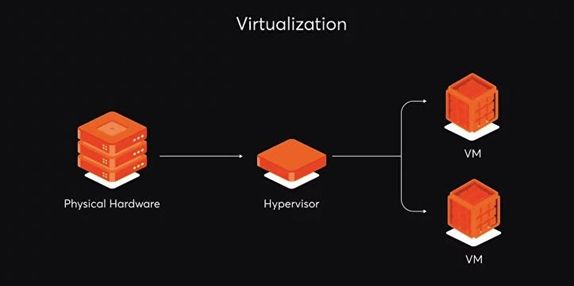
Image via ITMagic
Benefits of Virtualization
In this section, I’ll discuss the many benefits of virtualization. This will help you make an informed decision about which business areas to virtualize.
Let’s discuss them below.
Improved security
One of virtualization’s biggest advantages is its high data protection level. With virtualization, you can isolate your data on virtual systems so they remain independent.
If your data is ever attacked, virtualization technology will help keep it safe. It contains malicious activity on isolated virtual systems, keeping it from spreading.
Reduced costs
Virtualization reduces the need for bulky physical hardware, cuts procurement and maintenance costs, and provides a unified platform for business operations. It also saves money that would otherwise be spent on maintaining multiple machines.
Flexibility and scalability
Virtualization provides flexibility and scalability that would be unattainable using traditional setups. It allows you to work from different physical hosts without disrupting your workflow.
With virtualization, you can easily scale your business to accommodate new customer demands while staying current with changing market trends. Read this Attrock guide to learn more about scaling your ecommerce business.
Improved Efficiency
Virtualization provides convenient access and enables workforce mobility. It empowers employees to work from any location at any time.
Accessing virtual computing resources enables teams to streamline their infrastructure management. Virtual computing resources, like project time tracking tools, improve operational efficiency and reduce time.
5 Business Areas You Should Virtualize
Transitioning from traditional architecture to virtualization can be daunting if you lack experience. An effective approach would be to pinpoint specific business areas and implement virtualization strategies.
Here are 5 business areas you should virtualize.
1. Applications
Some of the most crucial business areas you should virtualize are your applications. With application virtualization, you can access your work applications from anywhere without installing them on a physical hard drive.
Application virtualization enables employees to securely access selected business apps while protecting your company’s data. For instance, virtual assistants for small businesses can have access to virtual applications which allow them to provide remote support to clients.
Additionally, your team members can also access applications like Google Meet using different browsers from remote locations.
2. Servers
Your servers are another crucial business area you should virtualize. Server virtualization allows you to partition and run your central server into multiple virtual servers using multiple operating systems.
Server visualization can prevent server overload issues. A single device can host multiple servers simultaneously, saving you time. The virtualization framework allows for fast work deployment, especially if you specialize in areas that require speedy internet connection, such as digital marketing.
3. Administrative
Another business area you should virtualize is your administrative area. This involves segmenting different administrative roles and limiting your employees’ access to data.
Administrative virtualization gives you better control over managing complex networks within your organization and helps boost employee productivity.
As an executive, you can allocate administrative responsibilities based on group and user policies. For example, a particular group of users can access and view specific data but can’t modify it. You can also grant access to another group to read and modify the data.
4. Desktop
Desktop virtualization involves giving your employees remote access to their desktops. This allows your team members to carry out their day-to-day tasks without being physically present on-site.
Desktop is one of the best business areas you should virtualize because it keeps your data safe. It encrypts and stores data using cloud computing.
With desktop virtualization, all authorized team members can access the data remotely.
5. Network
Your network is one of the crucial business areas you should virtualize because it helps you optimize your network resources.
Network virtualization involves creating virtual replicas of your network resources, such as routers, VPNs, switches, and logical ports. It consolidates your network’s software and hardware components into a single host server or virtual system.
Tips for Virtualization
Once you’ve decided on the business areas you should virtualize, you can start the migration process from traditional systems to virtualized architectures. Here are some tips to help you make a smooth transition:
- Virtualization exposes you to the risk of data loss. To prevent this, it is crucial to have a backup and recovery plan in place.
- Strengthen your cyber-security measures to safeguard your data from any breaches.
- Carry out regular testing and maintenance on your virtual systems.
Ready to Virtualize Your Business Today?
Virtualization technology has transformed the way businesses operate today. It helps save costs, improve security, and enhance scalability and flexibility.
In this post, I have explored some business areas you should virtualize in 2024. They include applications, servers, administrative, desktops, and network virtualization. Virtualization has many benefits that will help you promote and grow your business.
When migrating to virtualization technology, create a backup and recovery plan. Also, invest in API security measures to stay protected from cyber attacks.
Finally, as your business scales, don’t be afraid to explore more virtualization possibilities.
##
ABOUT THE AUTHOR

Gaurav Sharma is the founder and CEO of Attrock, a results-driven digital marketing company. Grew an agency from 5-figure to 7-figure revenue in just two years | 10X leads | 2.8X conversions | 300K organic monthly traffic. He also contributes to top publications like HuffPost, Adweek, Business 2 Community, TechCrunch, and more.