Virtual machines provide a digital representation of a computer, creating a separate, secure ecosystem that can have various applications.
We’re going to take a look at the different types of virtual machines and what benefits they offer.
What is a Virtual Machine?
A virtual machine is a piece of software that acts as a digital representation of a computer. Virtual machine (VM) software substitutes physical computer infrastructure and hardware with software.
Virtual machines are capable of many of the same tasks as physical computers, including running operating systems, running programs, storing data, and connecting to networks. For these processes, virtual machines are referred to as “hosts,” while the operating system being run is the “guest.”
How do Virtual Machines Work?
Virtual machines need to be connected to a physical server or computer through a program called a hypervisor. The hypervisor acts as an intermediary between the physical hardware, such as the CPU, storage, and memory, and the virtual machine.
The hypervisor supplies the virtual machine with the necessary hardware requirements from the host OS. The hypervisor also allows many different VMs to be run from the same physical computer, separating the different VMs from one another and abstracting the resources of the physical computer into a pool so they can be dispersed as required.
The Two Different Types of Virtual Machines
Virtual machines can be categorized into one of two types.
System Virtual Machines

Image sourced from geeksforgeeks.org
System virtual machines are designed to create multiple virtual environments replacing an entire real machine. The hardware resources of the host can be shared amongst multiple virtual machines, meaning that the host systems can support multiple virtual environments.
The virtual environments are kept separate, even though they’re located on the same physical host. In this way, several operating systems can share the host machine’s resources concurrently.
System virtual machines can provide a simulated hardware environment distinct from the instruction set architecture of the host. However, developers can still perform tasks without needing to change operating systems, as all data generated is stored on the host’s hard drive.
There is the risk that a virtual machine may become less efficient than a physical machine when indirectly accessing the host’s hard drive. Variations in the speed at which different VMs perform tasks on the same host machine can also pose a problem, leading to potentially unstable behavior.
Process Virtual Machines

Image sourced from geeksforgeeks.org
Process virtual machines are also known as Managed Runtime Environments (MREs) or application virtual machines. They support a single process, running as standard applications within the host’s operating system.
Process virtual machines provide high-level abstractions and are implemented using interpreters. Each process virtual machine can only run one process on the host machine.
A process virtual machine is triggered to launch when a process starts and is destroyed when it exits. This means that each VM can offer high-level security for each individual process.
Runtime software is required for a process virtual machine to function as a platform-independent programming environment.
Benefits of Using Virtual Machines
There are numerous benefits to using virtual machines, including the following.
Save Money
Virtual machines can help reduce the operating costs of organizations, eliminating the need to invest in expensive hardware, such as physical servers and their maintenance.
Additionally, virtual machines can also be leveraged for marketing automation, allowing businesses to automate repetitive marketing tasks and save time and money in the long run.
Save Energy
The ability to run several virtual machines from one physical computer also reduces operating costs, such as the cost of electricity. This helps to save money on energy bills while simultaneously reducing the organization’s carbon footprint.
Remote Operations
Many organizations use virtual machines to help solve the problems that arise from undertaking remote operations, as they can provide the same setting, user interfaces, and applications that a user would find on a physical machine.
This makes it easier for employees or other collaborators to work remotely without having workflows interrupted-facilitating remote work and global collaboration. This is especially important given the increasing trend towards remote work globally.
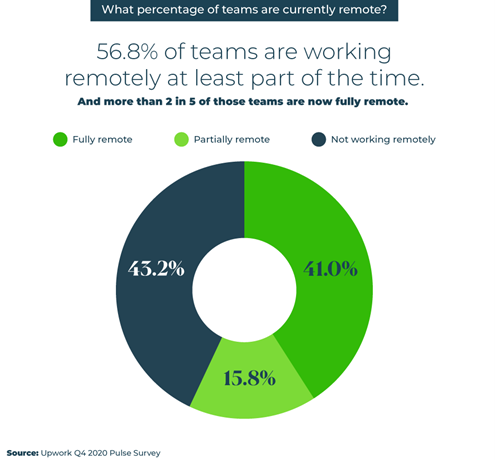
Image sourced from Upwork
Scalability
The availability and performance of programs and apps can easily be scaled when using VMs. Real or virtual servers can be easily added to distribute the workload and improve performance as required.
Security
VMs provide a safe space to run and test applications and software, such as a new version of the Spark Catalyst optimizer, away from the larger network ecosystem. Potentially dubious or infected software and files can be accessed through a virtual machine without compromising the safety of the host operating system.
Easy Backup
It’s easy to back up virtual machines as well as copy and move them. In the event of a catastrophic event that leads to data loss, virtualized environments can be replaced in a matter of minutes.
Virtual Machines; Virtually Unstoppable!
Virtual machines have a range of applications, from giving remote workers access to your software to developing an app that allows you remotely control PC from Android phone to creating a secure sandbox for testing software and bugs.
Both system virtual machines and process virtual machines have their pros and cons, which you should consider carefully before choosing how you’ll proceed.
Either way, there’s little doubt that adopting virtual machines will help you to save costs, increase security, and improve your scalability.