Is your organization prepared for a dynamic digital ecosystem? Most organizations understand that their traditional IT infrastructure is no longer capable of responding to the challenges that come up in terms of scalability, flexibility, and cost-efficiency.
If this sounds like your situation, you may be wondering how to renew your IT infrastructure without changing your whole system. Virtualization has the real possibility of turning your IT setup into an effective and economical mechanism. But where do you start?
What is Virtualization?
The first and foremost thing is to understand what virtualization exactly stands for. Virtualization can be termed as creating something virtual, rather than using hardware for servers, storage, or networks.
Virtualization can enable organizations to leverage to the fullest their resources, cut dependencies on hardware, and offer flexible, scalable IT systems. The process of virtualization involves inserting a layer between the computing hardware and OSes with VMs on physical servers, enabling several workloads to run on a single server.
Assess Current IT Infrastructure

The first step in modernizing your IT infrastructure with virtualization is to assess the setup that exists in your enterprise at present. Understand what you have in place before making changes. Consider the following:
- Limitations of servers and hardware
- Network bottlenecks
- Storage capacities and needs
- Current software and applications
This assessment helps in identifying which areas will benefit most from virtualization. The involvement of key stakeholders and the best online cpa services for startup is crucial to gaining a comprehensive understanding of what meets expectations and identifying loopholes related to performance, scalability, or resource management.
Identify Key Areas for Virtualization
After understanding your existing setup, it’s time to identify which parts of your system will benefit most from virtualization. Most accounting and bookkeeping service for startups begin with server virtualization. This not only simplifies IT management by reducing reliance on physical hardware but also provides a scalable and flexible foundation for handling the growing data demands of accounting and bookkeeping operations.
However, there are many other areas where this can be applied:
Server Virtualization
This is quite often the first and most important step. Virtualizing your servers allows you to run many virtual servers on a single physical machine, thereby reducing hardware costs while improving resource utilization.
Network Virtualization
Normally, network virtualization helps you manage and optimize your network more effectively through the decoupling of physical hardware and the logical functions of the network. Virtual networks are easier to configure, expand, and secure.
Storage Virtualization
This is a type of virtualization where your storage devices are virtualized into one logical pool. Furthermore, this allows for a more flexible and efficient management of your storage resources, particularly within the context of the ever-growing demands of data.
By consolidating your storage into a unified system, you can streamline management, improve performance, and scale resources more effectively. From the analysis done above regarding the current constraints and performance bottlenecks, choose the kind of virtualization that would bring the most benefit to your business, ensuring it aligns with your specific needs and growth projections.
Choose the Right Virtualization Platform
The selection of a correct virtualization platform remains one of the most critical decisions in this modernization process. Indeed, several popular platforms exist that deliver unique features and benefits.
When choosing a platform, it is important to consider the current needs and their potential for growth in your IT infrastructure. Cost, scalability, ease of integration, and support of existing startup bookkeeping are among the points that can be considered in making such a choice.
Optimize Virtual Machines for Performance
After successfully implementing virtualization, one of the highest things on your agenda will be performance optimization for your VMs. If these are not well optimized, you could end up with resource bottlenecks that could negate the benefits of virtualization. To enhance performance, consider:
Resource Allocation

Allocate CPU, memory, and storage resources according to the requirements of each VM. Similarly, over-allocation of resources is also not advisable as it introduces inefficiencies.
Monitoring
This is through monitoring performance by using monitoring tools on your VMs. Measuring resource utilization, latency, and any errors for the speed identification and rectification of errors.
Load Balancing
Further workload distribution is needed to prevent resource exhaustion on an individual server within the virtualized environment. Regular review and updates will ensure that your IT infrastructure is agile and performing optimally.
Ensure Security and Compliance
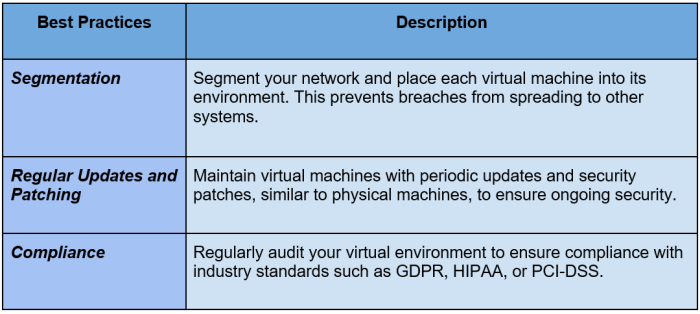
However, the virtualization of your infrastructure presents additional security risks since numerous virtual machines are running on one piece of hardware. It is always good to have measures put in place to ensure that your virtual environment is safe from possible threats.
Train IT Staff and Build Expertise
The last step to modernize your IT infrastructure with virtualization is properly training your IT staff in managing the new environment. The technology behind virtualization can be pretty complex, and hence it is going to be important to equip your team for managing the changes.
- Ongoing Training: Regular training will update your IT staff with the latest virtualization tools and practices.
- Developing Expertise: Support certification of your group members in virtualization technologies.
- Collaboration with Vendors: Work closely with vendors of virtualization platforms to avail yourself of the support and training that could be needed to make things smooth.
Conclusion
Virtualization is one of the most modern and effective methods of renewing IT infrastructure; it offers better scalability, flexibility, and cost-efficiency. Evaluating your present system, and selecting the appropriate platform, followed by the step-by-step implementation of virtualization, will enable you to create an agile and future-friendly IT environment.
With proper planning optimization and staff training, virtualization has the potential to transform your IT infrastructure in a manner that positions your business for success over the long term.
FAQs
1. What is virtualization in IT infrastructure?
Virtualization creates virtual versions of servers, storage, or networks, allowing more efficient use of hardware.
2. How does virtualization benefit my business?
It reduces hardware costs, improves scalability, enhances resource utilization, and allows for easier management of IT resources.
3. Which areas of my IT infrastructure can be virtualized?
Common areas include servers, networks, storage, and desktops.