
On many occasions, we need to access a service or protected resources from outside a Kubernetes cluster. Sometimes, we authorize our applications, also known as programmatic clients, to perform API requests on our behalf. These clients make requests with the necessary credentials which represent their digital identity (e.g., cookie, ID token, Access token, Kubernetes Service Account). The authentication service needs to handle all of the digital identities. With this in mind, we extended AuthService -our authentication proxy- with distinct authentication methods, one for each type of digital identity. In this article, Ι will describe the authentication methods we developed to authenticate applications that use a JWT or opaque access token, describe their differences and user cases.
Access token authentication
For security reasons, Istio decides to allow or block all the requests that target any in-cluster resources by ensuring that the callers:
- are who they claim to be (authentication), and
- have the necessary permissions to perform the examined request (authorization).
Although Istio supports token verification it does not support the OIDC Flow, so we introduced AuthService which acts as an OIDC client and an authentication proxy for Kubeflow. You can learn more about it here.
To perform authentication, each request needs to be accompanied by the necessary credentials. Amongst many different types of digital identities that can be used as credentials, programmatic clients tend to use access tokens. The service responsible for issuing, storing and managing access tokens (and other digital identities) is the Identity Provider (IdP). AuthService can be integrated with various external IdPs. Each IdP exposes a series of OAuth 2.0 and OpenID Connect endpoints, which are essential for the Authentication Flow, both for issuing and validating the tokens.
Typically, the programmatic clients use an access token issued by an IdP, as a Bearer token in the Authorization header of their request, so AuthService can retrieve it and perform authentication. The access tokens can be of either JWT (JSON Web Token) or opaque format. Let’s now examine the key differences between the two.
JWT vs Opaque access token
JWT access token
The JWT token can be decoded, parsed and interpreted by the bearer of the token and it consists of three sections: a Header, a Payload, and a Signature.
When issuing a JWT token, the IdP signs the hashed Header and Payload with their private key. One can validate locally the JWT access token without sending it to the IdP that issued it, by verifying its signature using the public key of the respective key pair.
Therefore, AuthService needs to maintain a list of trusted public keys. This is possible via the JWKS (JSON Web Key Sets), which is essentially a list of JWK (JSON Web Key) objects. Each JWK contains the public key needed to verify a JWT token issued and signed by the IdP, with some additional metadata. AuthService distinguishes which JWK corresponds to which JWT via the key ID (kid) that both include. AuthService contacts the IdP’s JWKS endpoint to retrieve and update this list.
Opaque access token
Opaque access tokens cannot be decoded, parsed and interpreted by the bearer of the token. To authenticate a client that uses an opaque token you need to contact the IdP that issued this token.
A positive response from the IdP suggests that the examined token is valid. Opaque tokens can be used with the /userinfo endpoint to return a user’s profile. From the retrieved information, one can deduce if the user has permission to perform the request.
Access token authentication methods
Both JWT and opaque access tokens are invaluable for authenticating programmatic clients, so we rolled up our sleeves and extended AuthService to support authenticating both. Admins can select either the JWT or the opaque access token authentication method based on the access token type provided by their IdP and the tradeoffs of each choice.
The key difference between the two methods is that for the opaque access token authentication, AuthService contacts the IdP for verification. In contrast, on JWT the validation happens locally.
Solution 1: JWT access token authentication
Let’s examine the authentication flow when a client sends a request to an in-cluster service with a JWT access token in the Authorization header.

- Client: Perform HTTP request to Kubeflow with an access token in the Authorization header.
- Istio Gateway: Intercept the HTTP request and send it to AuthService.
- AuthService: Check whether the HTTP request has an Authorization header and retrieve the JWT access token from it.
- AuthService: Iterate over the available authentication methods to authenticate the request. (All the authentication methods prior to the JWT will fail.)
- AuthService: Examine if this token targets the external identity authenticator. The token must be of JWT format and include the expected issuer (iss) and audience (aud).
- AuthService: Examine the token expiration time (exp) and validate that the token has not expired. (If the token has expired then respond to Istio Gateway with HTTP 401.)
- AuthService: Validate the signature (sig) of the token, based on the key ID (kid) referenced in the token. The signature validation procedure includes the following checks:
- If the kid corresponds to a JWK of the cached JWKS, then validate the signature of the token. If the signature is invalid, then respond to Istio Gateway with HTTP 401.
- If the kid does not correspond to a JWK of the cached JWKS, then:
- AuthService: Send a request to the JWKS Endpoint to fetch the new keys.
- Identity Provider: Respond to AuthService with the JWKS.
- AuthService: Cache the new JWKS.
- AuthService: If the kid is in the cached JWKS, validate the signature (sig). If either the kid does not correspond to a JWK of the cached JWKS or the signature is invalid, respond to Istio Gateway with HTTP 401.
- AuthService: Retrieve the UserID and the groups of this client.
- AuthService: Respond to Istio Gateway that the client was successfully authenticated (HTTP 200), and set the UserID header for this client.
- Istio Gateway: Forward the request to Kubeflow with the UserID header.
- Kubeflow: Perform the action that the client requested and respond back to Istio Gateway. (Kubeflow performs authorization by using Kubernetes RBAC)
- Istio Gateway: Forward the response to the client.
Solution 2: Opaque Access token authentication
Let’s examine step-by-step what happens when a client makes a request to an in-cluster service with the opaque access token in their Authorization header.

- Client: Perform HTTP request to Kubeflow with an opaque access token in the Authorization header.
- Istio Gateway: Intercept the HTTP request and send it to the AuthService.
- AuthService: Check whether the HTTP request has an Authorization header and retrieve the opaque access token from it.
- AuthService: Iterate over the available authentication methods to authenticate the request. (All the authentication methods prior to the opaque will fail.)
- AuthService: Send a request to the /userinfo endpoint of the external IdP with the retrieved opaque access token in the Authorization header. (If the token is expired, respond to Istio Gateway with HTTP 401. If the IdP cannot recognize the access token, it will respond with an error and AuthService will continue with the next authenticator.)
- AuthService: Retrieve the UserID and the groups of the user from the successful response of the external IdP, according to the AuthService configurations. (If the response does not include these claims, respond to Istio Gateway with HTTP 401.)
- AuthService: Respond to Istio Gateway that the client was successfully authenticated (HTTP 200) and set the UserID header for the client.
- Istio Gateway: Forward the request to Kubeflow with the UserID header.
- Kubeflow: Perform the action that the client requested and respond back to Istio Gateway. (Kubeflow performs authorization by using Kubernetes RBAC.)
- Istio Gateway: Forward the response to the client.
Conclusion
AuthService allows us to authenticate external identities of either kind. Here is the overview of the benefits and setbacks of each approach:
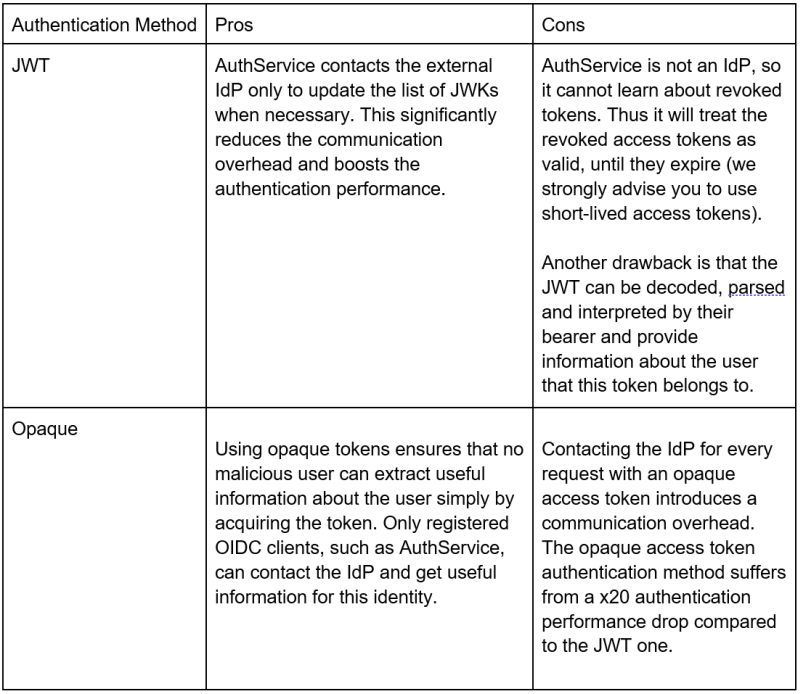
The admins should carefully assess the above aspects and configure AuthService with one of the two options.
##
To learn more about the transformative nature of cloud native applications and open source software, join us at KubeCon + CloudNativeCon Europe 2023, hosted by the Cloud Native Computing Foundation, which takes place from April 18-21.
ABOUT THE AUTHOR
Athanasios Markou, Software Engineer, Arrikto

Athanasios is a Software Engineer at Arrikto, working on authentication solutions for Kubeflow. He holds a Diploma in Electrical and Computer Engineering from the National Technical University of Athens. He is a Kubernetes and Kubeflow enthusiast. He loves Open Source and currently maintains the Arrikto’s oidc-authservice repository.


